Version: 5.07 Last Updated: 23 Apr 2017 Release: 22 Mar 2011 Category: Office tools > PDF
Rate this software:
1035 downloads
View Screenshots(3)
Comments
Download
Liked it? Tell others:
Advanced PPT To PDF Details
Works on: Windows 10 | Windows 8.1 | Windows 8 | Windows 7 | Windows XP | Windows 2000 | Windows 2003 | Windows 2008 | Windows 98 | Windows ME | Windows NT | Windows Vista | Windows 2012 SHA1 Hash: 87e81e4ec2c89399355e335f1ac968850cc560d0 Size: 11.2 MB File Format: exe
Rating: 2.0
out of 5
based on 23 user ratings
Publisher Website: External Link Downloads: 1035 License: Demo / Trial Version
Advanced PPT To PDF is a demo software by Tenorshare and works on Windows 10, Windows 8.1, Windows 8, Windows 7, Windows XP, Windows 2000, Windows 2003, Windows 2008, Windows 98, Windows ME, Windows NT, Windows Vista, Windows 2012.
You can download Advanced PPT To PDF which is 11.2 MB in size and belongs to the software category PDF. Advanced PPT To PDF was released on 2011-03-22 and last updated on our database on 2017-04-23 and is currently at version 5.07.
Thank you for downloading from SoftPaz! Your download should start any moment now. It would be great if you could rate and share:
Rate this software:
Share in your network:
Advanced PPT To PDF Description
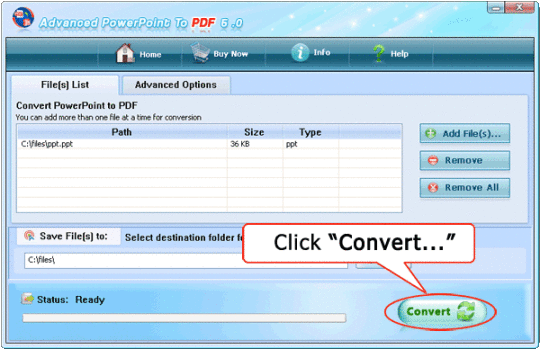
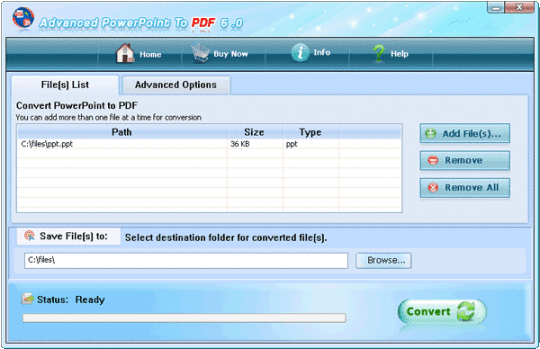
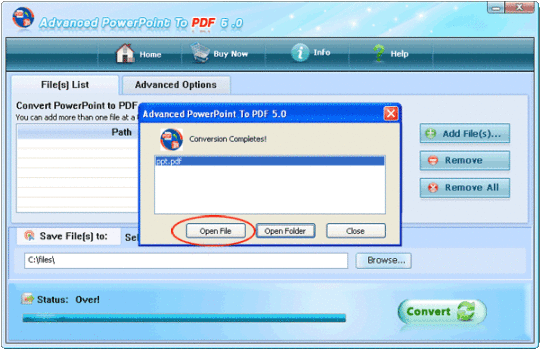
Advanced PPT to PDF Converter is a fast, affordable utility to allow you to batch convert Microsoft PowerPoint presentations into professional-quality documents in the popular PDF file format. It is easy-to-use software which can translate different doucment formats to pdf in batches once with ease.The converting process is finished in short time.The conversion will be as original as an original format and all this comes with this effortless user friendly software. Whether you are an experienced user or a beginner,you can operate effortlessly. Easy to use Converting Microsoft PowerPoint presentations into PDF files couldnt be easier. Convert One File:Right-click an PPT(.ppt, .pptx, .pptm) file and select "Convert to PDF" from the pop-up menu. Convert a batch of Files:Simply drag the PPT(.ppt, .pptx, .pptm) files you want to convert to the file list and click the "Convert" button. Advanced PPT to PDF quickly re-creates your PPT(.ppt, .pptx, .pptm) files as fully-formatted PDF files. Convert the editing file with PowerPoint Add-Ins:Click the button in the MS PowerPoint toolbar Convert to PDF accurately You will be amazed at the results you get from advanced PPT to PDF. It accurately retains the layout of the original PPT file. Converts text in over 100 languages and separates graphics from tables and text. Work with Hot Directories You can set up a monitored directory, where all Powerpoint files written to that directory will be converted to PDF as they are saved. All of the converting will be recorded in log files. Good Security The PDF files created by Advanced PPT to PDF are protected with strong 128bit encryption. Therefore, your PDF documents could be protected by Owner Password, User Password and more advanced features to against from copying text and images, modification to document and comments, printing document, etc. Able to add PDF properties when converting PPT to PDF If convert Microsoft
Where to buy?
Last updated price and discount information 9 years agoupdate now



 Windows NT and above
 View Screenshots(3)
 Comments
 Download





 Similar Software


 Recently Searched
 Software Categories
 Trending Software


 Like Us
