Works on: Windows 10 | Windows 8.1 | Windows 8 | Windows 7 | Windows XP | Windows 2000 | Windows 2003 | Windows 2008 | Windows Vista | Windows 2012 SHA1 Hash: a7ff4d99221c8cff5a56cc255a4f5e0bf544596d Size: 10.18 MB File Format: exe
Rating: 2.3
out of 5
based on 23 user ratings
Publisher Website: External Link Downloads: 163 License: Demo / Trial Version
Aiprosoft DVD to iRiver Converter is a demo software by Aiprosoft Studio and works on Windows 10, Windows 8.1, Windows 8, Windows 7, Windows XP, Windows 2000, Windows 2003, Windows 2008, Windows Vista, Windows 2012.
You can download Aiprosoft DVD to iRiver Converter which is 10.18 MB in size and belongs to the software category Audio CD DVD Burning. Aiprosoft DVD to iRiver Converter was released on 2010-08-30 and last updated on our database on 2017-02-16 and is currently at version 3.
Thank you for downloading from SoftPaz! Your download should start any moment now. It would be great if you could rate and share:
Rate this software:
Share in your network:
Aiprosoft DVD to iRiver Converter Description
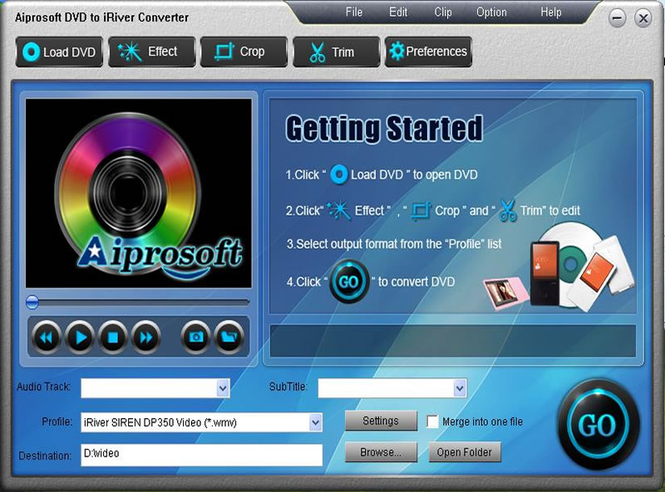
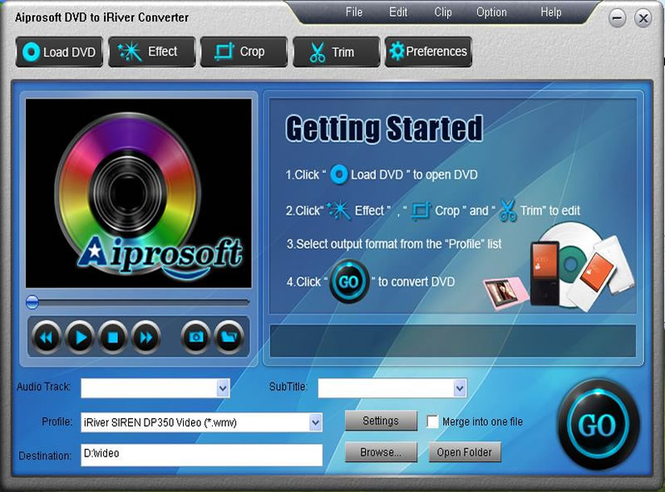
Aiprosoft DVD to iRiver Converter is an excellent DVD to iRiver Converter program, which can efficiently convert DVD to iRiver compatible video and audio formats, like MPEG-4 (.mp4), H.264/MPEG-4 AVC (.mp4), WMV, AVI, and MP3, OGG, WMA. These converted files can be played on all popular iRiver players. Key Functions: 1. Directly convert DVD to iRiver video and audio Aiprosoft DVD to iRiver Converter can perfectly and professionally convert DVD to MPEG-4 (.mp4), H.264/MPEG-4 AVC (.mp4),WMV, AVI video and MP3, OGG, WMA audio that can be played on all iRiver devices. 2. Convert DVD to iRiver series The supported iRiver devices includes iRiver X20, iRiver B20, iRiver Clix, iRiver SIREN DP350, iRiver Mplayer, Volcano, T series, E series and PMP series. 3. DVD display effect Aiprosoft DVD to iRiver Converter offers different effect parameters, video Brightness, Contrast, Saturation and audio Volume. 4. Customize output video and audio parameters 5. Clip into segments and crop frame size Set accurate time length clips according to your preference and cut off unwanted area of a video to feature a highlight fitted for your different BlackBerry series. 6. Merge into one file If you want to merge the selected contents into one file you can check the “Merge into one file” option. As default the merged file is named after the first selected file. 7. Select audio track and subtitle It allows you to rip the whole DVD movie with selectable target subtitle, audio track for your output file. 8. Support Preview You can preview the input video and output video at the same time for your comparison. 9. Snapshot function If you like the current image of the video you can use the “Snapshot” option to take a snapshot of the film and save as a picture file. 10. Easy to use
Where to buy?
Last updated price and discount information 9 years agoupdate now



 Windows 2000 and above
 View Screenshots(2)
 Comments
 Download





 Similar Software


 Recently Searched
 Software Categories
 Trending Software

 Like Us

