Version: 6.2 Last Updated: 15 Apr 2017 Release: 07 Sep 2011 Category: CD DVD Blu-ray Tools
Rate this software:
1060 downloads
View Screenshots(3)
Comments
Download
Liked it? Tell others:
Aiseesoft Sony Ericsson Video Converter Details
Works on: Windows 10 | Windows 8.1 | Windows 8 | Windows 7 | Windows XP | Windows 2000 | Windows 2003 | Windows 2008 | Windows Vista | Windows 2012 SHA1 Hash: a3360029724519c2ed8084b0cb7db3b5f536033f Size: 22.34 MB File Format: exe
Rating: 1.9
out of 5
based on 23 user ratings
Publisher Website: External Link Downloads: 1060 License: Demo / Trial Version
Aiseesoft Sony Ericsson Video Converter is a demo software by Aiseesoft Studio and works on Windows 10, Windows 8.1, Windows 8, Windows 7, Windows XP, Windows 2000, Windows 2003, Windows 2008, Windows Vista, Windows 2012.
You can download Aiseesoft Sony Ericsson Video Converter which is 22.34 MB in size and belongs to the software category CD DVD Blu-ray Tools. Aiseesoft Sony Ericsson Video Converter was released on 2011-09-07 and last updated on our database on 2017-04-15 and is currently at version 6.2.
Thank you for downloading from SoftPaz! Your download should start any moment now. It would be great if you could rate and share:
Rate this software:
Share in your network:
Aiseesoft Sony Ericsson Video Converter Description
Aiseesoft Sony Ericsson Video Converter is a Sony Ericsson video converting software to convert all popular video(3GP, 3G2, AVI, DV, DIF, FLV, SWF, F4V, MOD, MJPG, MJPEG, MKV, MPG, MP4, MPEG, MPEG-2, VOB, DAT, M4V, QT, MPV, MOV, RM, RMVB, TOD, TS, TRP, TP, WMV, ASF, HD video) and audio(AAC, AIF, AIFF, CUE, FLAC, M4A, MP3, MP2, APE, OGG, AC3, RA, RAM, AU, WAV, WMA) files to Sony Ericsson compatible video and audio formats. Moreover, it will bring you much faster converting speed with the AMD APP and NVIDIA CUDA technology, and it can also support 5.1 channel audio.
Key Features
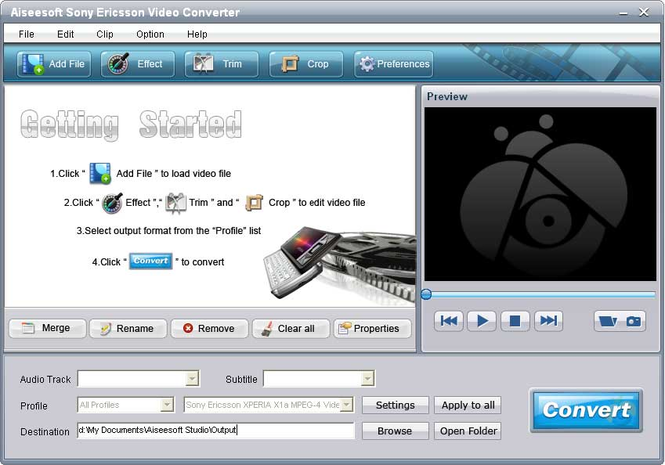
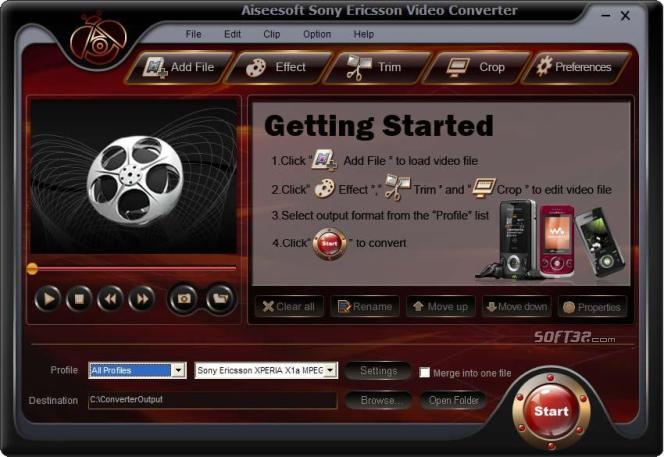
1. Video trimming and cropping
Trim any segment of a video and crop the video frame aspect ratio and playing area.
2. Merge video
Aiseesoft Sony Ericsson Video Converter can join several video pieces together and output it to a whole one.
3. Set output profile
You are given the access to respectively set output formats for different files and pressing Apply to all button to make all files apply the same profile.
4. Customize output settings
Set the Video Encoder, Resolution, Frame Rate, Video Bitrate. You can also directly input your own resolution; Set the Audio Encoder, Sample Rate, Channels, Audio Bitrate. You also can save all the output settings as your preference, which is saved in the user-defined column automatically.
5. Snapshot picture and preview
With this Sony Ericsson Video Converter, it provides the original video preview and output video preview, you can see the video effect when you modify it. Once you get one desired movie scene, you can take snapshot, and saved it as JPEG, GIF or BMP formats picture.
6. Improve the effects of interlacing video by using deinterlacing
This Sony Ericsson Converter owns the technique to eliminate some jaggedness from the interlacing video for better viewing.
7. Selectable output formats from profile
Aiseesoft Sony Ericsson Video Converter enables you to convert video to different formats at the same time.
Where to buy?
Last updated price and discount information 9 years agoupdate now



 Windows 2000 and above
 View Screenshots(3)
 Comments
 Download





 Similar Software


 Recently Searched
 Software Categories
 Trending Software
 Like Us


