Version: 1.7 Last Updated: 17 Feb 2017 Release: 28 Dec 2009 Category: Security > Encrypting
Rate this software:
163 downloads
View Screenshots(2)
Comments
Download
Liked it? Tell others:
ASL Crypto Manager Details
Works on: Windows 10 | Windows 8.1 | Windows 8 | Windows 7 | Windows 2012 SHA1 Hash: 42332af8b2427b0327ceade69266ba378263bba9 Size: 525.95 KB File Format: exe
Rating: 1.9
out of 5
based on 23 user ratings
Publisher Website: External Link Downloads: 163 License: Demo / Trial Version
ASL Crypto Manager is a demo software by Actual Software Lab and works on Windows 10, Windows 8.1, Windows 8, Windows 7, Windows 2012.
You can download ASL Crypto Manager which is 525.95 KB in size and belongs to the software category Encrypting. ASL Crypto Manager was released on 2009-12-28 and last updated on our database on 2017-02-17 and is currently at version 1.7.
Thank you for downloading from SoftPaz! Your download should start any moment now. It would be great if you could rate and share:
Rate this software:
Share in your network:
ASL Crypto Manager Description
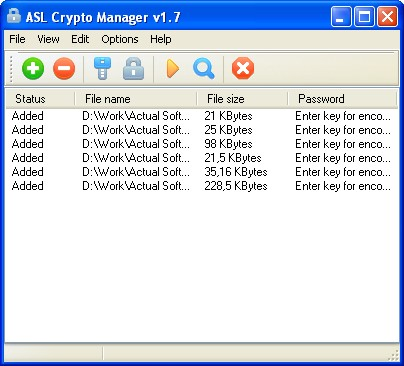
The ASL Crypto Manager encryption software is intended for fast encrypting of any user's files. For this purpose, RC4, a high-speed on-the-fly algorithm of encrypting, is used in the program. The program allows you to encrypt any file and to pass it safely to another person, using the common methods (portable data medium, e-mail message, local area network, etc.) Prior to the encrypting of any file, a key word is set up. Without knowing the password, it's impossible to decrypt the file by any means. The program also allows you to handle the encrypting of multiple files (in one pass) with identical or different passwords.
After encrypting, the program creates a file with *.cmf (Crypto Manager File) extension in the folder of the source file or at a different place specified by the user. The options allow for saving or deleting of the source file after encrypting. Any attempt at opening the encrypted file leads to its opening in the ASL Crypto Manager program (if the program is installed on the computer).
The distinguishing feature of the program is that the program offers two options of password input: the standard and the safe ones. The standard input is using the keyboard. The safe input is performed by means of the mouse and the on-screen keyboard. The second option of input excludes the possibility of intercepting the password by a keyboard spy (key logger), as the keys on the keyboard are not pressed. The safe mode of input is accessible only on the registered version of the program.
Where to buy?
Last updated price and discount information 9 years agoupdate now



 Windows 7 and above
 View Screenshots(2)
 Comments
 Download





 Similar Software


 Recently Searched
 Software Categories
 Trending Software

 Like Us
