Works on: Windows 10 | Windows 8.1 | Windows 8 | Windows 7 | Windows XP | Windows 2000 | Windows 2003 | Windows 2008 | Windows Vista | Windows 2012 SHA1 Hash: bacca245c8c78e12b606e4f9ebcbdd5f338712bf Size: 5.93 MB File Format: zip
Rating: 2.0
out of 5
based on 23 user ratings
Publisher Website: External Link Downloads: 215 License: Demo / Trial Version
Aurigma Graphics Mill is a demo software by Aurigma Inc. / Everythingcyber and works on Windows 10, Windows 8.1, Windows 8, Windows 7, Windows XP, Windows 2000, Windows 2003, Windows 2008, Windows Vista, Windows 2012.
You can download Aurigma Graphics Mill which is 5.93 MB in size and belongs to the software category Components Libraries. Aurigma Graphics Mill was released on 2005-08-01 and last updated on our database on 2017-02-17 and is currently at version 2.
Thank you for downloading from SoftPaz! Your download should start any moment now. It would be great if you could rate and share:
Rate this software:
Share in your network:
Aurigma Graphics Mill Description
Graphics Mill 2.0 is a "must have" imaging component. It supplies the most important features: load/save popular formats, apply effects, draw text/shapes, use color management, etc. It provides a solid basis to build professional imaging software.
When other imaging component vendors left ActiveX platform and focused on .NET market, Aurigma decided that it is too early to drop the ActiveX market. ActiveX is still the prevalent platform (at least for desktop apps) and it still requires a powerful imaging solution - Graphics Mill.
Features
* Fast & memory-friendly algorithms.
* Load/save images:
o JPEG,PNG,GIF,WBMP,TIFF,BMP (read/write);
o PCX,PSD (read);
o PDF,SWF (write);
o Special fast thumbnailing method;
* Color management:
o Load/save embedded ICC profiles in files;
o Convert color spaces with ICC profiles;
o Draw image using device profile.
* Reduce colors to 2-256 colors (with predefined or adaptive palettes and various dithering methods).
* Combine images.
* Can display progress bar.
* Transforms: resize,rotate,crop,wave,custom projective transform (e.g. perspective),etc.
* Image correction: HSL,brightness/contrast,levels , channelbalance,etc.
* Artistic effects: buttonize,emboss,glow,mosaic , shadow , etc .
* Filters: blur,edge detect,median,sharpen,etc.
* Low-level access to pixels (to make fast custom effects).
* Drawing:
o 2 drawing engines (GDI/GDI+);
o Draw lines,curves,rects,ellipses , text(can be outlined),etc;
o Change pen/brush params;
o Can get text extent;
* Controls and dialogs:
o Scrollable viewer control:
+ Rubber-band select/zoom;
+ Zoom in/out display, scale-to-gray method for 1-bit images;
+ Displays non-opaque images properly;
+ Applies color management;
o Open/Save dialog:
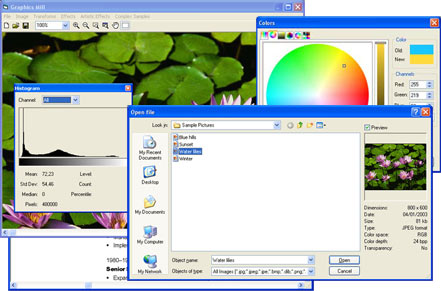
+ Image preview;
+ Displays basic file info;
o Color picker dialog;
* Powerful demo app (with source code) - great starter kit.
Where to buy?
Last updated price and discount information 9 years agoupdate now



 Windows XP and above
 View Screenshots(3)
 Comments
 Download





 Similar Software


 Recently Searched
 Software Categories
 Trending Software

 Like Us

