Version: 1 Last Updated: 25 Apr 2017 Release: 12 Mar 2013 Category: System
Rate this software:
103 downloads
View Screenshots(1)
Comments
Download
Liked it? Tell others:
AutoMat Details
Works on: Windows 10 | Windows 8.1 | Windows 8 | Windows 7 | Windows XP | Windows 2000 | Windows 2003 | Windows 2008 | Windows Vista | Windows 2012 SHA1 Hash: 1cf15c2a31e143ebc47a5e5275da101b48d51e0a Size: 1.49 MB File Format: msi
Rating: 1.7
out of 5
based on 23 user ratings
Downloads: 103 License: Free
AutoMat is a free software by AutoMat and works on Windows 10, Windows 8.1, Windows 8, Windows 7, Windows XP, Windows 2000, Windows 2003, Windows 2008, Windows Vista, Windows 2012.
You can download AutoMat which is 1.49 MB in size and belongs to the software category System. AutoMat was released on 2013-03-12 and last updated on our database on 2017-04-25 and is currently at version 1.
Thank you for downloading from SoftPaz! Your download should start any moment now. It would be great if you could rate and share:
Rate this software:
Share in your network:
AutoMat Description
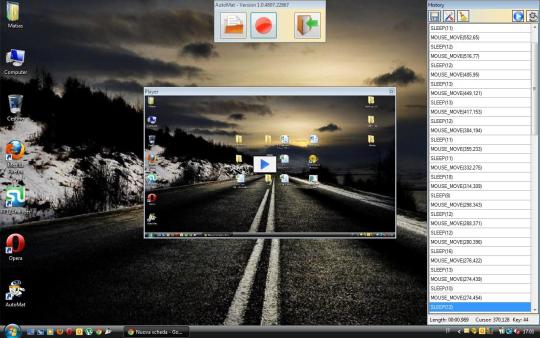
AutoMat is a simple application designed to provide you with proper means of automating parts of your work, specifically the repetitive tasks, that do not always require your presence.With AutoMat, you can record every step you take in performing certain operations, such as writing batch files or creating scripts. The utility is fairly simple to work with, just press the Rec button (the red circle), and you can start recording your computerscreen, along with all the actions you perform, such as creating new files, typing words or opening folders.After you have recorded all your moves, press the ESC key to stop the recording, and from the History section of the program you can list all the steps you took. You can even edit your mouse movements or completely delete certain entries.The Play button enables you to view the recording, so you can decide whether it contains everything you need or of you need to add something more. Afterward, you can save the file to AM format, and play it whenever you want to get out of doing boring tasks. AutoMat will do exactly what you did, meaning it will open and work on the files you worked, it will create new files or visit web pages.AutoMat is an efficient application, that can prove quite useful for some, as it helps you save time and effort by automating repetitive tasks. While the program is quite interesting, its uses can be rather limited. As such, you can only work with AutoMat in situations where your actions are identical from one task to the next.
Whats new in this version:
Added AMCP (AutoMat Command Line Player)Allows only one instance of the applicationFile Type Association (.am)Allows to Enable/Disable ToolTip Help (Settings)



 View Screenshots(1)
 Comments
 Download




 Similar Software


 Recently Searched
 Software Categories
 Trending Software
 Like Us

 Windows XP and above


