Works on: Windows 10 | Windows 8.1 | Windows 8 | Windows 7 | Windows XP | Windows 2000 | Windows 2003 | Windows 2008 | Windows 98 | Windows ME | Windows NT | Windows Vista | Windows 2012 SHA1 Hash: 0c23cdd60f67fedc2834d1ff0ea97e800bbf80d3 Size: 6.98 MB File Format: exe
Rating: 2.3
out of 5
based on 23 user ratings
Publisher Website: External Link Downloads: 255 License: Demo / Trial Version
Backup Engine is a demo software by Multiicon and works on Windows 10, Windows 8.1, Windows 8, Windows 7, Windows XP, Windows 2000, Windows 2003, Windows 2008, Windows 98, Windows ME, Windows NT, Windows Vista, Windows 2012.
You can download Backup Engine which is 6.98 MB in size and belongs to the software category Backup and Recovery. Backup Engine was released on 2013-11-25 and last updated on our database on 2017-02-21 and is currently at version 9.
Thank you for downloading from SoftPaz! Your download should start any moment now. It would be great if you could rate and share:
Rate this software:
Share in your network:
Backup Engine Description
It?s very important to backup for the ones who has total concern with computer and has important data to deal with or the ones who face regular electricity troubles. Taking this need into consideration, we at Multiicon have developed the software called Backup Engine. It is powerful and handy software useful for taking Backup, Schedule Backup, Real Time Backup, Data Backup, Auto Backup, File Backup, and Folder Backup.
Backup Engine principally takes backup by two ways:
1) Schedule Backup
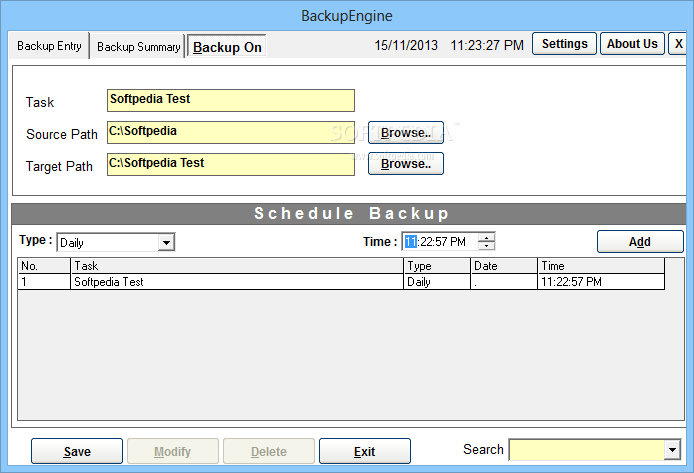
Schedule Backup is used to take the backup on time. For this, you have to select the task, source path, destination path and set the schedule.
2) Real Time Backup
Real time backup is used to set the real time backup option. Real time backup takes the copy of one file from the source path to target path on its own.
It?s features are listed as under ::
Take Backup on schedule
Take Backup on Real Time [i.e. Auto-Backup]
Take Backup of numerous files or folder at a time
Set schedule backup at a difference of one second
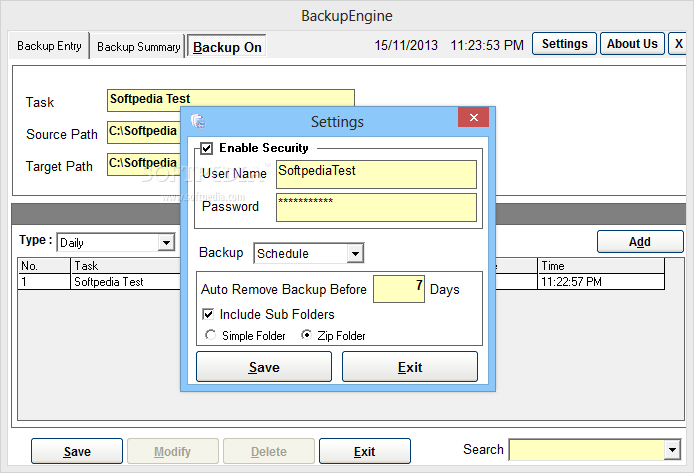
Removes old backup automatically
Takes backup of a file which you are working on
Date & Time wise folder creation
Hence, instead of putting in manual efforts for backup, just source and target the path once and feel free, Backup Engine will reduce all your efforts and will take the backup on its own.
Where to buy?
Last updated price and discount information 9 years agoupdate now



 Windows NT and above
 View Screenshots(2)
 Comments
 Download





 Similar Software


 Recently Searched
 Software Categories
 Trending Software

 Like Us


