Version: 3.01 Last Updated: 24 Apr 2017 Release: 17 Oct 2012 Category: Multimedia > Video
Rate this software:
252 downloads
View Screenshots(1)
Comments
Download
Liked it? Tell others:
Bluefox AVI to PSP Converter Details
Works on: Windows 10 | Windows 8.1 | Windows 8 | Windows 7 | Windows XP | Windows 2000 | Windows 2003 | Windows 2008 | Windows 98 | Windows ME | Windows Vista | Windows 2012 SHA1 Hash: 5b0b9b734bbc9766594a9eb5be886ccee062af95 Size: 12.38 MB File Format: exe
Rating: 2.6
out of 5
based on 23 user ratings
Publisher Website: External Link Downloads: 252 License: Demo / Trial Version
Bluefox AVI to PSP Converter is a demo software by Bluefox Studio and works on Windows 10, Windows 8.1, Windows 8, Windows 7, Windows XP, Windows 2000, Windows 2003, Windows 2008, Windows 98, Windows ME, Windows Vista, Windows 2012.
You can download Bluefox AVI to PSP Converter which is 12.38 MB in size and belongs to the software category Video. Bluefox AVI to PSP Converter was released on 2012-10-17 and last updated on our database on 2017-04-24 and is currently at version 3.01.
Thank you for downloading from SoftPaz! Your download should start any moment now. It would be great if you could rate and share:
Rate this software:
Share in your network:
Bluefox AVI to PSP Converter Description
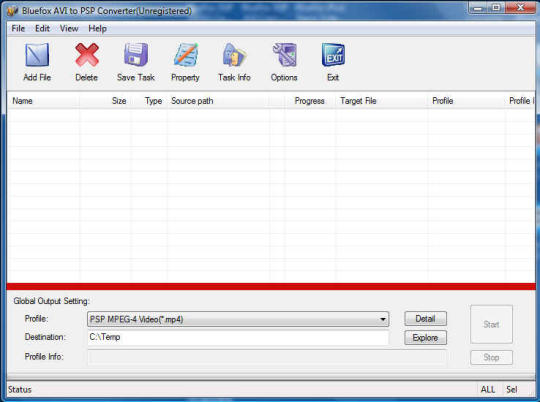
Bluefox AVI to PSP Converter can easily convert AVI format video files to PSP MP4 video format with super fast conversion speed and high output quality.This AVI to PSP converter offers an easy way to convert almost all popular AVI video/movies to MP4 video that Sony PSP can play. It also supports H.264 (High quality) and MPEG-4 video in MP4 format used in Sony PSP. And it provides Multithreading and batch conversion.Download Bluefox AVI to PSP Converter to enjoy your favorite videos or movies on your stylish Sony PSP.Key Feature1.Batch conversion-- you can enactment every video converting task flexibly, and the task can be saved and load.3.User-adjustable codec parameter setting -- All of the video codec parameters is optimized and predigested, the default setting can get good quality video, and you also can set them flexibly to get excellent quality video files.4.View the information of the original files-- You can view the detail information about video codec, video bit rate, frame rate, audio codec, audio bit rate, sample rate etc. 5.Windows VISTA supported well6.Perfect support H.264 format 7.Concise and friendly interface 8.Play video files for preview-- You can play video files to be converted in the list for the purpose of preview.
Whats new in this version:
Version 3.01.12.1008 may include unspecified updates, enhancements, or bug fixes.
Where to buy?
Last updated price and discount information 9 years agoupdate now



 Windows 98 and above
 View Screenshots(1)
 Comments
 Download





 Similar Software


 Recently Searched
 Software Categories
 Trending Software

 Like Us

