Version: 3 Last Updated: 24 Feb 2017 Release: 02 Apr 2008 Category: System
Rate this software:
166 downloads
View Screenshots(3)
Comments
Download
Liked it? Tell others:
Comfort Paste Details
Works on: Windows 10 | Windows 8.1 | Windows 8 | Windows 7 | Windows XP | Windows 2000 | Windows 2003 | Windows 2008 | Windows ME | Windows Vista | Windows 2012 SHA1 Hash: b0457ef948d2b226a15030df31a4fdb83fb69ca4 Size: 1.59 MB File Format: exe
Rating: 2.3
out of 5
based on 23 user ratings
Publisher Website: External Link Downloads: 166 License: Demo / Trial Version
Comfort Paste is a demo software by Comfort Software Group and works on Windows 10, Windows 8.1, Windows 8, Windows 7, Windows XP, Windows 2000, Windows 2003, Windows 2008, Windows ME, Windows Vista, Windows 2012.
You can download Comfort Paste which is 1.59 MB in size and belongs to the software category System. Comfort Paste was released on 2008-04-02 and last updated on our database on 2017-02-24 and is currently at version 3.
Thank you for downloading from SoftPaz! Your download should start any moment now. It would be great if you could rate and share:
Rate this software:
Share in your network:
Comfort Paste Description
Comfort Paste is a template manager you can use to quickly paste frequently used text fragments and images.
Why do you particularly need Comfort Paste?
Despite the visible simplicity of the interface, Comfort Paste has powerful features that will help to forget about the routine of your work and speed it up.
Comfort Paste will help you to quickly complete the following tasks:
+ Paste frequently used phrases, signatures, smiles, addresses, greetings, passwords, etc.
+ Create all kinds of messages and documents using templates.
+ Paste images from a predefined list.
+ Paste regularly repeated fragments while programming: HTML, SQL, Pascal, etc.
How does Comfort Paste work?
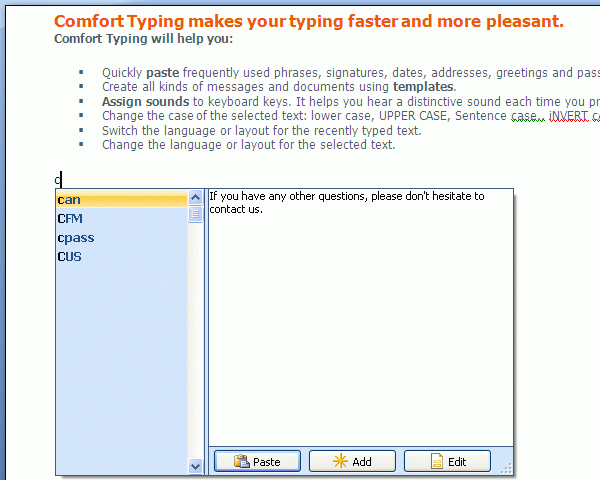
Every template has a name and the manager searches the database for it. Just type the name of the template or only its beginning and press Win+Space (by default).
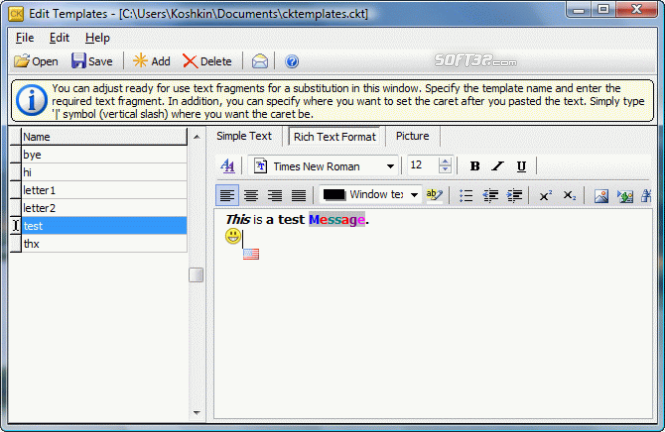
There are three types of templates:
1. Plain text.
2. RTF (Rich Text Format) - as in MS Word, OpenOffice, MS WordPad, etc.
3. Image.
You can add various macros to text templates: keystrokes, tags for inserting random text from a predefined list, etc.
Comfort Paste includes a mechanism for quick and comfortable template configuration.
It is easy to use Comfort Paste in workgroups. To do it, just save the template file to a network resource and configure it to be used on every workstation.
It is completely compatible with Microsoft Windows Vista, XP and 2000.
http://www.comfort-software . com / template - manager . html
Where to buy?
Last updated price and discount information 9 years agoupdate now



 Windows ME and above
 View Screenshots(3)
 Comments
 Download





 Similar Software


 Recently Searched
 Software Categories
 Trending Software


 Like Us

