Version: 6 Last Updated: 16 Apr 2017 Release: 17 Aug 2012 Category: Office tools
Rate this software:
1123 downloads
View Screenshots(1)
Comments
Download
Liked it? Tell others:
Content Central Details
Works on: Windows 10 | Windows 8.1 | Windows 8 | Windows 7 | Windows XP | Windows 2000 | Windows 2003 | Windows 2008 | Windows Vista | Windows 2012 SHA1 Hash: d45db4ce6cb98407d8adda3fc112887ddd0aacf3 Size: 136.37 MB File Format: exe
Rating: 2.3
out of 5
based on 23 user ratings
Publisher Website: External Link Downloads: 1123 License: Demo / Trial Version
Content Central is a demo software by Ademero, Inc. and works on Windows 10, Windows 8.1, Windows 8, Windows 7, Windows XP, Windows 2000, Windows 2003, Windows 2008, Windows Vista, Windows 2012.
You can download Content Central which is 136.37 MB in size and belongs to the software category Office tools. Content Central was released on 2012-08-17 and last updated on our database on 2017-04-16 and is currently at version 6.
Thank you for downloading from SoftPaz! Your download should start any moment now. It would be great if you could rate and share:
Rate this software:
Share in your network:
Content Central Description
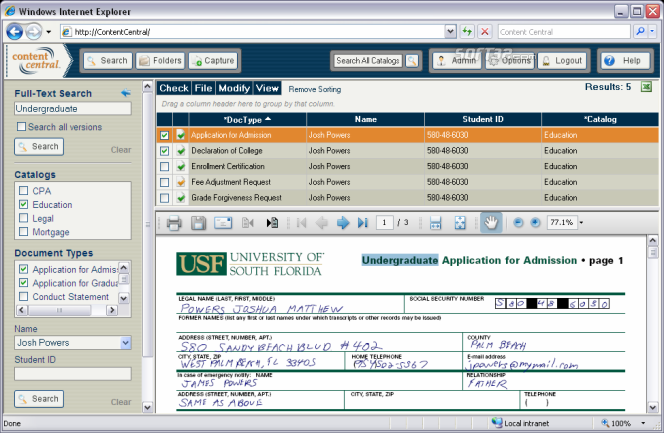
Ademero makes document capture, retrieval, and management simple with Content Central—giving organizations like yours quick and easy access to information. This all-in-one, browser-based document management system provides what matters most to you: Access, Speed, and Security.
Access your information from any computer on the network with a standard Web browser. View your information on site even when you're off site when you provide internet access to Content Central.
Scan paper using an existing copier (MFP) or desktop scanner. DirectScan lets you scan documents directly into your Web browser using any TWAIN-compliant scanner. QCards can be printed and used as cover sheets to identify one or more documents when scanned using a network scanner. Point Content Central at your existing electronic files to ensure your documents remain organized and protected. Capture any file locally or remotely with a convenient drag-and-drop interface. Scanned images and uploaded content will be automatically named and filed as they're captured. A zonal-recognition engine can extract information from scanned documents, recognizing barcodes or text.
Documents and other content can be edited with a single mouse click. A check-out feature guarantees document revisions won't be lost, and all changes will be tracked.
A powerful approval-processing and workflow engine simplifies business processes. Users approve or reject documents arriving in their approval queue. Automated notifications alert users when one or more documents in their queue reach a deadline. Retention policies can be defined for each collection of documents in the system. Expired documents will be instantly removed from the system.
Find documents by searching for any word contained in the document even if the original was in paper form. Content Central also allows you to find documents using index fields for document classification, such as Vendor Name, PO Number, or Invoice Number.



 Windows 2000 and above
 View Screenshots(1)
 Comments
 Download




 Similar Software


 Recently Searched
 Software Categories
 Trending Software
 Like Us


