Works on: Windows 10 | Windows 8.1 | Windows 8 | Windows 7 | Windows 2012 SHA1 Hash: d77ae94784b30e60503d63099007e985aacc833e Size: 5.37 MB File Format: jar
Rating: 2.4
out of 5
based on 23 user ratings
Downloads: 136 License: Free
Databrid is a free software by Datarid and works on Windows 10, Windows 8.1, Windows 8, Windows 7, Windows 2012.
You can download Databrid which is 5.37 MB in size and belongs to the software category Databases Tools. Databrid was released on 2009-05-05 and last updated on our database on 2017-04-16 and is currently at version 1.6.
Thank you for downloading from SoftPaz! Your download should start any moment now. It would be great if you could rate and share:
Rate this software:
Share in your network:
Databrid Description
Databrid is a browsing, retrieval and manipulation tool designed for the novice to the expert user. Databrid works on MySql and Oracle Database (versions 8 and above although not all functionality in the Browser is available for the lower versions). The core functionality of Databrid revolves around the tabbed areas within the Databrid application. The four main tabs in the main screen of Databrid are: SQL Editor, Browser, File and Jobs.
## SQL EDITOR ##
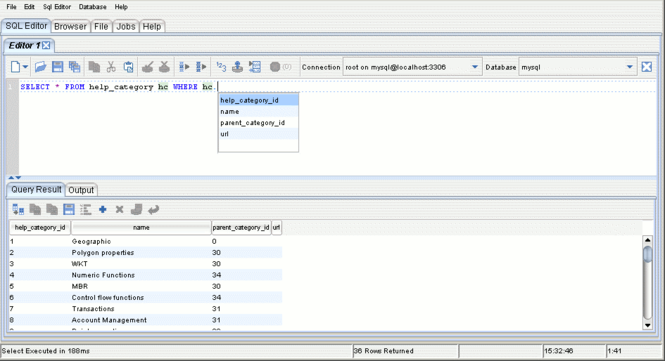
The SQL Editor tab allows you to write and run SQL and PLSQL. The tab provides the ability to use one of more sql autocompletion, word and syntax highlighting editors with automatic case adjustment for keywords. Provided with each editor is a table for displaying SQL query results and a text output area to display DBMS_Output output. Jobs can be run in the background allowing for the execution of multiple statements at any given time.
## BROWSER ##
The Browser tab allows the you to browse various parts of the database schema. The browsing is done via a particular schema user and displays information on tables, views, sequences etc. Features include the generation of database creation statements for tables, views etc, browsing table or view data, truncating tables, etc.
## FILE ##
The File tab allows you work with a CSV (comma delimited text file) and the database without having to load the CSV into the database. This tab has two areas that functionality: CSV Update and Database Update. CSV Update allows you to add additional columns to a CSV using a Select statement, including binding CSV column values to the Select statement. Database Update allows you to update the database using insert, updates, deletes or PLSql by binding the CSV column values into your statement.
## JOBS ##
This tab allows you to view which jobs are currently running or have finished. Jobs that are running can also be stopped.



 Windows 7 and above
 View Screenshots(3)
 Comments
 Download




 Similar Software


 Recently Searched
 Software Categories
 Trending Software
 Like Us


