


 Windows XP and above
| Rate this software: | |
| 1217 downloads | |
 View Screenshots(5)
 Comments
 Download




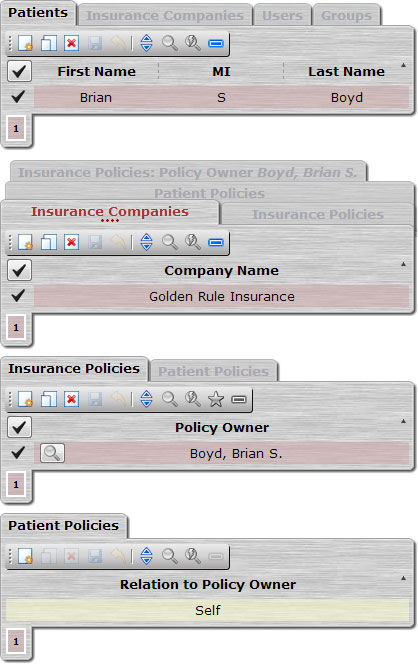
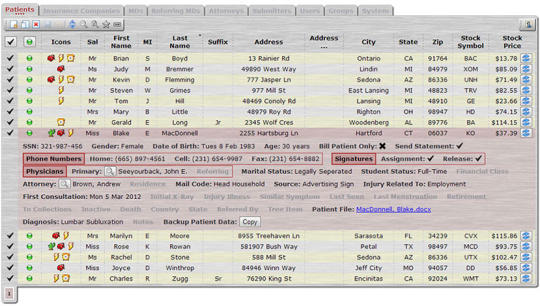
You create and modify your data model as you build your application simply by specifying the relationships between tables in the dbiScript code.The application GUI is generated on-the-fly, whenever the browser is refreshed or a user logs in.The GUI is presented as a series of page frames, following these basic steps:The dbiScript application code is scanned for tables which do not have parent (foreign) tables. These tables form the tabs of the initial page frame.When a record is selected in a tab of the initial page frame, the dbiScript application code is scanned for all descendant tables of the selected table. These tables form the tabs of the second page frame, which is displayed beneath the initial page frame.When a record is selected in a tab of the second page frame, the procedure of step 2 is repeated to generate a third page frame, and so on.Each successive page frame will have fewer tabs than the previous one.Eventually, there will be no more descendant tables to display and selecting a record does not generate a new page frame.The number of steps it takes to get to this point depends on the complexity of the data model and the path the user has chosen to take through the data tables.Every dbiScript application is unique.As you build your application, the complexity of the data model increases exponentially.dbiScript delivers a powerful yet elegant GUI which gracefully masks the true complexity of the underlying data model.The download includes sample applications and easy-to-follow set-up instructions.
 Similar Software


 Recently Searched
 Software Categories
 Trending Software


 Like Us

Free Windows software, games, themes and wallpapers with direct download links since 2011.
