Works on: Windows 10 | Windows 8.1 | Windows 8 | Windows 7 | Windows XP | Windows 2000 | Windows 2003 | Windows 2008 | Windows Vista | Windows 2012 SHA1 Hash: 12d5cad5bae56fa0fe4c1f0d938a2bc8d4f8d805 Size: 18.11 MB File Format: exe
Rating: 2.4
out of 5
based on 23 user ratings
Downloads: 199 License: Free
Dictionarist is a free software by Dictionarist and works on Windows 10, Windows 8.1, Windows 8, Windows 7, Windows XP, Windows 2000, Windows 2003, Windows 2008, Windows Vista, Windows 2012.
You can download Dictionarist which is 18.11 MB in size and belongs to the software category Home and Education. Dictionarist was released on 2010-05-20 and last updated on our database on 2017-04-22 and is currently at version 1.
Thank you for downloading from SoftPaz! Your download should start any moment now. It would be great if you could rate and share:
Rate this software:
Share in your network:
Dictionarist Description
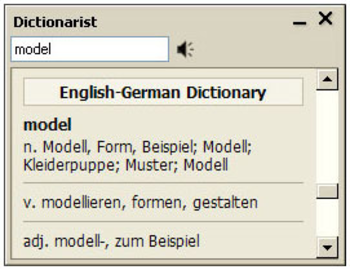
Dictionarist is a dictionary program which can translate with a single click free of charge. By highlighting any word on your computer, it translates automatically by clicking on the combination of a click on the concerned key and the mouse. An internet connection is not required; it is fast and supports many languages. General specifications: Easy usage with a single click. Usage without needing Internet connection. Compatible with all Windows applications. Pronunciation facility. Multi interface language. Usage in the mood of a title bar. Multi-language support. Extended word database. Clues: If you wish to learn the definition of a word by using the dictionary in the title bar mood, it displays the meanings of the word in the title bar of the current window without permitting the intervention of other windows. If you wish to learn the definition of an idiom composed of more than one word highlight it by remaining Ctrl + Mouse pushed. If you choose the window to be automatically closed, the word window will automatically get hidden when you move the mouse away from the window after learning the definition of the word. You can increase the size of the word window by pushing on the combination of Ctrl + "+" and decrease its size by pushing at Ctrl + "-". You can open the word window by pushing the "F10" button on your keypad and hide it by pressing "ESC".



 Windows XP and above
 View Screenshots(1)
 Comments
 Download




 Similar Software


 Recently Searched
 Software Categories
 Trending Software
 Like Us


