Works on: Windows 10 | Windows 8.1 | Windows 8 | Windows 7 | Windows XP | Windows 2000 | Windows 2003 | Windows 2008 | Windows 98 | Windows ME | Windows NT | Windows Vista | Windows 2012 SHA1 Hash: b0ed484b635e1baaa8cbd57e57a92f9b3fb68c1c Size: 8.95 MB File Format: zip
Rating: 2.2
out of 5
based on 23 user ratings
Publisher Website: External Link Downloads: 247 License: Demo / Trial Version
EMS Data Comparer for SQL Server is a demo software by EMS Database Management Solutions and works on Windows 10, Windows 8.1, Windows 8, Windows 7, Windows XP, Windows 2000, Windows 2003, Windows 2008, Windows 98, Windows ME, Windows NT, Windows Vista, Windows 2012.
You can download EMS Data Comparer for SQL Server which is 8.95 MB in size and belongs to the software category Customer Management. EMS Data Comparer for SQL Server was released on 2012-11-20 and last updated on our database on 2017-04-24 and is currently at version 3.5.
Thank you for downloading from SoftPaz! Your download should start any moment now. It would be great if you could rate and share:
Rate this software:
Share in your network:
EMS Data Comparer for SQL Server Description
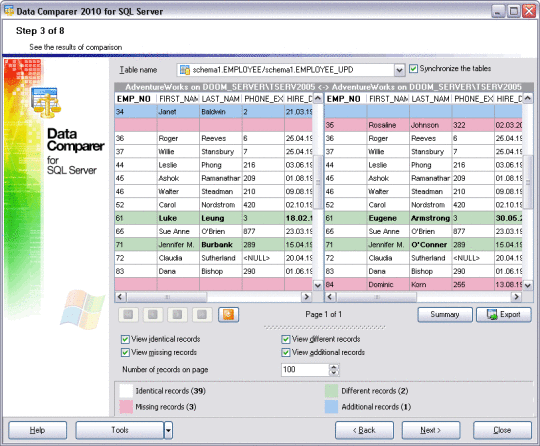
EMS Data Comparer for SQL Server is a tool for SQL Server data comparison and synchronization. Using this utility you can view all the differences in compared SQL Server tables and execute an automatically generated script to eliminate these differences. Flexible customization of the SQL Server comparison and synchronization process will enable you to select tables and fields for comparison, perform partial SQL Server data synchronization or data comparison for several tables at once and tune many other options to effectively compare SQL Server table data. Data Comparer for SQL Server includes a graphical wizard that will guide you through the SQL Server data comparison and synchronization process step by step, and a command-line utility for synchronizing SQL Server data in one-touch.
Whats new in this version:
Version 3.5.0.1 has added the possibility to manually set a list of synchronized records and at the "Setting tables correspondence" step a filter can be viewed as the pop-up window.
Where to buy?
Last updated price and discount information 9 years agoupdate now



 Windows NT and above
 View Screenshots(1)
 Comments
 Download





 Similar Software


 Recently Searched
 Software Categories
 Trending Software
 Like Us


