Version: 8.25 Last Updated: 16 Apr 2017 Release: 03 Feb 2012 Category: CD DVD Blu-ray Tools
Rate this software:
1244 downloads
View Screenshots(1)
Comments
Download
Liked it? Tell others:
Extra DVD to MPEG Ripper Details
Works on: Windows 10 | Windows 8.1 | Windows 8 | Windows 7 | Windows XP | Windows 2000 | Windows 2003 | Windows 2008 | Windows ME | Windows Vista | Windows 2012 SHA1 Hash: bb28c84d851d8da48c07368996059bcf5a135cf7 Size: 7.12 MB File Format: exe
Rating: 2.0
out of 5
based on 23 user ratings
Publisher Website: External Link Downloads: 1244 License: Demo / Trial Version
Extra DVD to MPEG Ripper is a demo software by Extra Global Creativity and works on Windows 10, Windows 8.1, Windows 8, Windows 7, Windows XP, Windows 2000, Windows 2003, Windows 2008, Windows ME, Windows Vista, Windows 2012.
You can download Extra DVD to MPEG Ripper which is 7.12 MB in size and belongs to the software category CD DVD Blu-ray Tools. Extra DVD to MPEG Ripper was released on 2012-02-03 and last updated on our database on 2017-04-16 and is currently at version 8.25.
Thank you for downloading from SoftPaz! Your download should start any moment now. It would be great if you could rate and share:
Rate this software:
Share in your network:
Extra DVD to MPEG Ripper Description
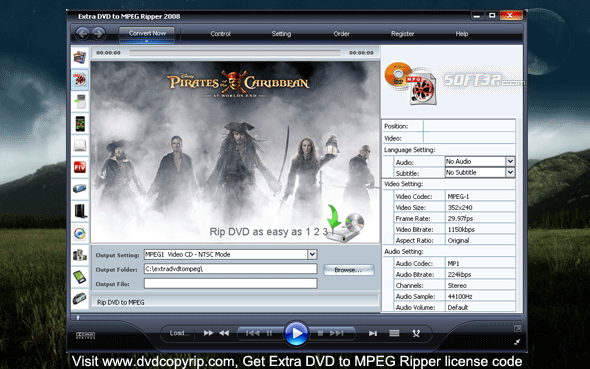
Extra DVD to MPEG Ripper is flexible and easy to use DVD ripper software. It can quickly convert DVD movies to MPEG without any loss of quality. It is super fast, with incredible output quality.
With Extra DVD to MPG Ripper, you can watch the DVD screen while ripping, and monitor the process. Enjoy movies anywhere, anytime! Download our free trial software and try it out!
Key features:
1. Rips DVD to MPEG file format.
2. Various settings provide flexibility and effectiveness of the output.
3. Offers a choice of which subtitles and Audio tracks to rip.
4. Output file size is adjustable. You can compress movies to any size you need.
5. You can see the ripping progress in a preview window.
6. Supports both NTSC and PAL video formats.
Why users like Extra DVD to MPG Ripper?
1. For one thing, it's fun! You can watch the video while the program is running - and you'll be amazed at how fast the process is.
2. New technology: latest industry standard compression technology ensures excellent image and sound quality. Get a smaller file with virtually the same quality as the original.
3. Easy to understand settings provide for flexibility and effectiveness in output.
4. You can choose which, if any, subtitles and Audio tracks to rip.
5. You can see the ripping progress in a preview window.
6. Supports both NTSC and PAL video formats.
7. You get lifetime FREE Technical Support, FREE upgrades and a 30-day money back guarantee when you purchase the programs. Why not try it now! Just download the free trial version!
Visit [www.dvdcopyrip.com] Get more DVD Copy, DVD Ripper, Video Converter software
Where to buy?
Last updated price and discount information 9 years agoupdate now



 Windows ME and above
 View Screenshots(1)
 Comments
 Download





 Similar Software


 Recently Searched
 Software Categories
 Trending Software

 Like Us

