Works on: Windows 10 | Windows 8.1 | Windows 8 | Windows 7 | Windows XP | Windows 2000 | Windows 2003 | Windows 2008 | Windows Vista | Windows 2012 SHA1 Hash: 055fad110af3ac6eb6364bdde0e945654de4e7a5 Size: 367.21 KB File Format: exe
Rating: 2.1
out of 5
based on 23 user ratings
Publisher Website: External Link Downloads: 129 License: Demo / Trial Version
fpHelp Builder is a demo software by Olsoft and works on Windows 10, Windows 8.1, Windows 8, Windows 7, Windows XP, Windows 2000, Windows 2003, Windows 2008, Windows Vista, Windows 2012.
You can download fpHelp Builder which is 367.21 KB in size and belongs to the software category File Editors. fpHelp Builder was released on 2007-12-04 and last updated on our database on 2017-03-07 and is currently at version 3.2.
Thank you for downloading from SoftPaz! Your download should start any moment now. It would be great if you could rate and share:
Rate this software:
Share in your network:
fpHelp Builder Description
Authors can use fpHelp Builder to create online help file for a software application or content for a multimedia title or web site. As an information delivery system, HTML Help is suited for a wide range of applications, including training guides, interactive books and electronic newsletters, as well as help for software applications.
Many other help-authoring tools usually do not provide easy and comfortable interface for creating and editing HTML files or managing content navigation structure. Fortunately, there are more suitable and powerful utilities such as Microsoft® FrontPage and fpHelp Builder. These programs not only allow you to design HTML pages and navigation structures of web sites, but also apply themes, manage links, receive reports, etc. In addition, the main advantage of this solution is that the user doesn't need to learn new software, but can use the already familiar one.
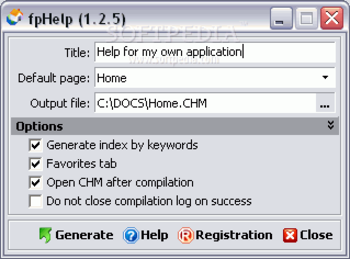
The fpHelp Builder is a very simple and powerful Microsoft FrontPage add-in that allows the conversion of a web site to a Microsoft HTML Help file (CHM file). The ability to work with FrontPage is enough to construct the Help file from any web site.
Once your web site is complete, you can compile it to create the final compressed help file (CHM file). As a help author, you manage the locations of your topic, contents, index, and other files. You can also modify the web site to match the design of your help system or can make other changes depending on the size and complexity of your system.
Instead of creating the traditional Help files you can convert any web site into a single compressed help (.chm) file which is the help standard for Microsoft Windows. After that you can distribute your sites as single units which could be manuals, Helps, guides, readme files, e-books, etc..
The main advantage of the fpHelp Builder is its simplicity and usability: in a few mouse clicks you will receive the CHM file from your FrontPage web site.
Where to buy?
Last updated price and discount information 9 years agoupdate now



 Windows XP and above
 View Screenshots(2)
 Comments
 Download





 Similar Software


 Recently Searched
 Software Categories
 Trending Software

 Like Us

