Version: 6.1 Last Updated: 17 Apr 2017 Release: 19 Aug 2013 Category: System > Benchmarks
Rate this software:
92 downloads
View Screenshots(1)
Comments
Download
Liked it? Tell others:
Full Cleaner Details
Works on: Windows 10 | Windows 8.1 | Windows 8 | Windows 7 | Windows 2012 SHA1 Hash: cfcc6c1adb928927c6437c02dc826759f29a5756 Size: 4.9 MB File Format: exe
Rating: 2.0
out of 5
based on 23 user ratings
Publisher Website: External Link Downloads: 92 License: Demo / Trial Version
Full Cleaner is a demo software by Full Software Studio and works on Windows 10, Windows 8.1, Windows 8, Windows 7, Windows 2012.
You can download Full Cleaner which is 4.9 MB in size and belongs to the software category Benchmarks. Full Cleaner was released on 2013-08-19 and last updated on our database on 2017-04-17 and is currently at version 6.1.
Thank you for downloading from SoftPaz! Your download should start any moment now. It would be great if you could rate and share:
Rate this software:
Share in your network:
Full Cleaner Description
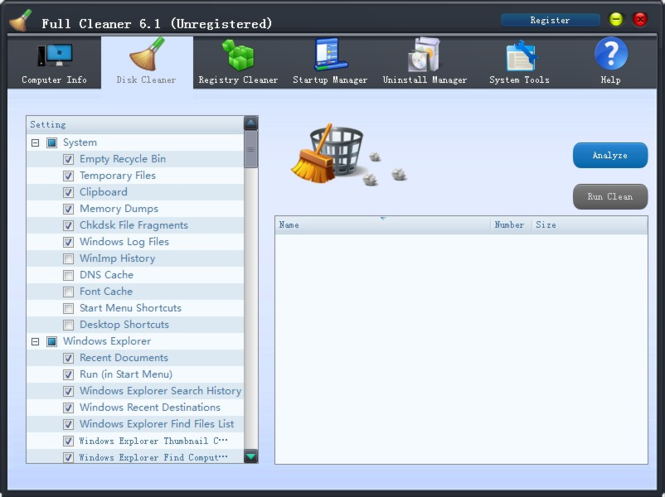
Full Cleaner removes unused files from your system - allowing Windows to run faster and freeing up valuable hard disk space. It also cleans traces of your online activities such as your Internet history. Additionally it contains a fully featured registry cleaner. But the best part is that it's fast (normally taking less than a second to run)
Key features:
1.Full Cleaner can help you optimize your system parameters to let your Windows run faster.
2.Full Cleaner provides you with the function of physically defragmenting your registry files. And this defragmentation can reduce application response time and registry access time.
3.Full Cleaner can provide you with a quick and customized scan over your system and present you with a list of registry errors information and proposed solution for you to consult.
4.Clear Windows's Recycle Bin, Recent Documents, Temporary files, Log files, Clipboard, DNS Cache, Error Reporting, Memory Dumps, Jump Lists.
5.With Full Cleaner, you can see the intuitive and detailed information of your system.
6.Clean Internet Explorer's Temporary files, history, cookies, super cookies, Autocomplete form history, index.dat files.
7.Clean Fireofx's Temporary files, history, cookies, super cookies, Autocomplete form history.
8.Clean Chrome's Temporary files, history, cookies, super cookies, Autocomplete form history.
9.Clean Opera's Temporary files, history, cookies, super cookies, Autocomplete form history.
10.Removes temp files and recent file lists (MRUs) from many apps including Windows Media Player, eMule, Google Toolbar, Microsoft Office, Nero, Adobe Acrobat, WinRAR, WinAce, WinZip and many more...
11.Advanced software uninstaller
12.Startup Manager
Where to buy?
Last updated price and discount information 9 years agoupdate now



 Windows 7 and above
 View Screenshots(1)
 Comments
 Download





 Similar Software


 Recently Searched
 Software Categories
 Trending Software

 Like Us


