Version: 1.2 Last Updated: 17 Apr 2017 Release: 20 May 2007 Category: CD DVD Blu-ray Tools
Rate this software:
1323 downloads
View Screenshots(1)
Comments
Download
Liked it? Tell others:
FunkyBit 3GP Video Converter Details
Works on: Windows 10 | Windows 8.1 | Windows 8 | Windows 7 | Windows XP | Windows 2000 | Windows 2003 | Windows 2008 | Windows Vista | Windows 2012 SHA1 Hash: ef6840e479398b084e6dae595faaeb4f2b0084f5 Size: 587 bytes File Format: exe
Rating: 2.0
out of 5
based on 23 user ratings
Publisher Website: External Link Downloads: 1323 License: Demo / Trial Version
FunkyBit 3GP Video Converter is a demo software by Funkybit Multimedia and works on Windows 10, Windows 8.1, Windows 8, Windows 7, Windows XP, Windows 2000, Windows 2003, Windows 2008, Windows Vista, Windows 2012.
You can download FunkyBit 3GP Video Converter which is 587 bytes in size and belongs to the software category CD DVD Blu-ray Tools. FunkyBit 3GP Video Converter was released on 2007-05-20 and last updated on our database on 2017-04-17 and is currently at version 1.2.
Thank you for downloading from SoftPaz! Your download should start any moment now. It would be great if you could rate and share:
Rate this software:
Share in your network:
FunkyBit 3GP Video Converter Description
FunkyBit 3GP Converter will benefit anyone who wants to have a collection of their favorite video at hand. Using this clever utility, you'll be able to quickly turn all kinds of video on your PC into 3GP format, thus making it available to run on a mobile phone.
FunkyBit 3GP Converter supports a great variety of formats for conversion, including .avi, .mpeg, .mov, .flv and .wmv, so you can be sure that the software will easily deal with absolutely any video file that can possibly be stored on your computer. The program is intuitive and easy-to-use. Everything is done to make your work quick and easy.
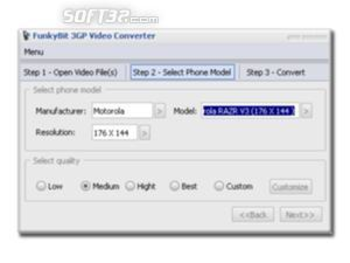
The creators of FunkyBit 3GP Converter have provided the utility with a convenient built-in wizard that will guide you through the file conversion in three plain steps. First, select the file you want to convert, then specify the conversion quality and the model of the phone to which the clip should be transferred. Finally, choose the location for an output file and start the conversion. With FunkyBit 3GP Converter, you won't need to get into the details of the conversion process to reach desirable results. The 3GP converter will automatically set the resolution and configure the file to make it compatible with the chosen phone so you can enjoy the sharing experience right away. The 3GP converter has all the necessary features required for converting to 3GP with ease. Its handy interface allows you to master the utility in no time at all and the built-in wizard proceeds through the conversion in the blink of an eye.
If you are looking for a solution that will make your video go mobile but don't want to deal with complex conversion details, FunkyBit 3GP Converter is a good pick!
Where to buy?
Last updated price and discount information 9 years agoupdate now



 Windows XP and above
 View Screenshots(1)
 Comments
 Download





 Similar Software


 Recently Searched
 Software Categories
 Trending Software


 Like Us


