Version: 1.02 Last Updated: 17 Apr 2017 Release: 19 Nov 2012 Category: Internet > FTP Clients
Rate this software:
204 downloads
View Screenshots(1)
Comments
Download
Liked it? Tell others:
Golden FTP Details
Works on: Windows 10 | Windows 8.1 | Windows 8 | Windows 7 | Windows XP | Windows 2000 | Windows 2003 | Windows 2008 | Windows Vista | Windows 2012 SHA1 Hash: 1b9beffcdb886200daf10650ec3a53a7305661a2 Size: 1.08 MB File Format: zip
Rating: 2.6
out of 5
based on 23 user ratings
Downloads: 204 License: Free
Golden FTP is a free software by Goldenftp and works on Windows 10, Windows 8.1, Windows 8, Windows 7, Windows XP, Windows 2000, Windows 2003, Windows 2008, Windows Vista, Windows 2012.
You can download Golden FTP which is 1.08 MB in size and belongs to the software category FTP Clients. Golden FTP was released on 2012-11-19 and last updated on our database on 2017-04-17 and is currently at version 1.02.
Thank you for downloading from SoftPaz! Your download should start any moment now. It would be great if you could rate and share:
Rate this software:
Share in your network:
Golden FTP Description
Golden FTP is a client software using pure FTP commands to complete FTP tasks.
The software focuses on project to suit requirements of software developers, web masters and administrators.
GoldenFTP contains many unique and outstanding features comparing with other FTP tools.
If you modify project hundreds of times every day, the software offers you many extraordinary conveniences.
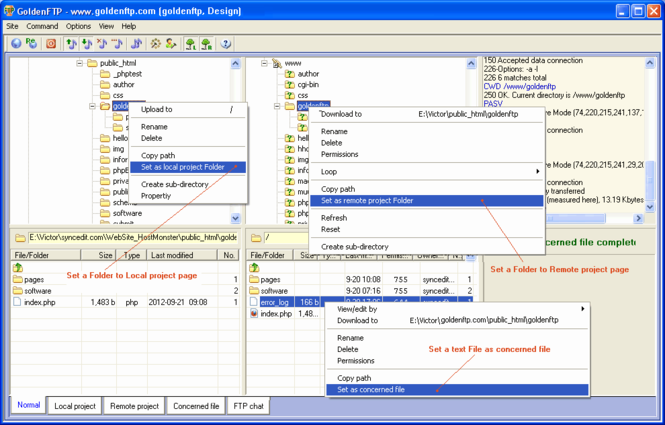
Once you set local and remote projects, you get many benefits that you dreamed before.
You do not need to select target folder for uploading and downloading files, the software calculates uploading and downloading paths, files will go to correct place automatically.
This feature makes uploading and downloading files very fast and safe, which avoids target errors you had before.
You can set a server text file (such as PHP error_log) as concerned file to view, refresh and even upload it easily.
With project benefits, you can search files on server side, compare project files and folders to find differences between local and server sides, and change server items to lowercase or uppercase automatically.
GoldenFTP provides methods for using FTP and HTTP tools to view and edit local and server files easily, those tools are FTP wizard (created by us) and common tools, such as FireFox, IE, Chrome, Notepad, Ms Word, WordPad, Ms Paint, PhotoShop, Windows Media Player and any software installed in your system. You can use those tools to evaluate and build local and server files to get best results.
GoldenFTP is also an easy-to-use software, which concerns user-considerations in details and contains convenient user-interfaces.
The software saves your time, energy and eye-visions to let you complete FTP tasks fast, safely and easily.



 Windows XP and above
 View Screenshots(1)
 Comments
 Download




 Similar Software
 Recently Searched
 Software Categories
 Trending Software
 Like Us

