
iJoysoft Blu Ray Ripper Description
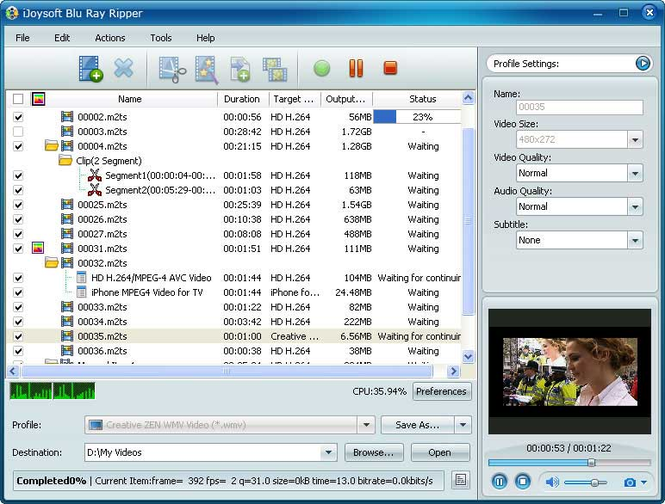
Users can now watch blu-ray videos on their multimedia devices in common popular video format by ripping and converting these blu-ray discs with the help of iJoysoft Blu Ray Ripper. Convert these ripped videos into HD format: H.264/MPEG-4 AVC, AVCHD Video (*.m2ts, *.mts), Apple TV h.264 720P, MKV, HD WMV, MPEG-2/MPEG-4 TS HD Video or popular common video format: AVI, MPEG, WMV, DivX, MP4, H.264/AVC, MKV, RM, MOV, XviD, 3GP, and FLV. Key Features: 1.Extract audio from blu-ray discs and convert to common audio formats (MP3, WMA, AAC, WAV, OGG, FLAC, APE, M4A, RA, AC3, MP2, AIFF, AMR, and SUN AU). 2.Specify interval and duration of a certain clip and capture and save it as movie stills (JPG, PNG, GIF, or BMP). 3.Resize your clips by trimming, or cropping; merge multiple files into one single file or split one single source file into several smaller clips. 4.Personalize your ripped video by adding watermark or text, turning it into old film, grayscale or snow-flaked vide. 5.The converted files should be compatible to play with popular multimedia devices such as iPod, iPhone, Apple TV, PSP, Xbox, Zune, NDS, Wii, and other mobile phones. 6.Change file properties such as bit rate, frame rate, resolution, codec, or audio and video quality. 7.Adjustable file parameters: video/audio quality, resolution, codec, bit rate, frame rate, sample rate and channel. 8.Convert a certain segment of a video by setting the start time and duration. 9.Calculate the output file before conversion by computing it with the bit rate calculator. 10.Change video quality by adjusting the brightness, saturation, color and contrast. 11.Preview your video with the built-in player and even take snapshots of the movie and save as pictures.



 Windows 7 and above
 View Screenshots(2)
 Comments
 Download




 Similar Software


 Recently Searched
 Software Categories
 Trending Software
 Like Us

