

LinsUIWPF Suite icon

LinsUIWPF Suite

2 big stars
LinsUIWPF Suite screenshot
Name: LinsUIWPF Suite
Works on: windowsWindows XP and above
Developer: DongMan
Version: 2
Last Updated: 27 Apr 2017
Release: 11 Feb 2015
Category: Programming
Rate this software:
1324 downloads
screenshotsView Screenshots(2)
commentsComments
downloadDownload
Liked it? Tell others:
details

LinsUIWPF Suite Details

Works on: Windows 10 | Windows 8.1 | Windows 8 | Windows 7 | Windows XP | Windows 2000 | Windows 2003 | Windows 2008 | Windows Vista | Windows 2012
SHA1 Hash: 974ff775937ccb911c0de3fca09519c632af2fb6
Size: 893.85 KB
File Format: zip
Rating: 2.2 out of 5 based on 23 user ratings
Publisher Website: External Link
Downloads: 1324
License: Demo / Trial Version
LinsUIWPF Suite is a demo software by DongMan and works on Windows 10, Windows 8.1, Windows 8, Windows 7, Windows XP, Windows 2000, Windows 2003, Windows 2008, Windows Vista, Windows 2012.
You can download LinsUIWPF Suite which is 893.85 KB in size and belongs to the software category Programming.
LinsUIWPF Suite was released on 2015-02-11 and last updated on our database on 2017-04-27 and is currently at version 2.
download button
Thank you for downloading from SoftPaz! Your download should start any moment now. It would be great if you could rate and share:
Rate this software:
Share in your network:
features

LinsUIWPF Suite Description

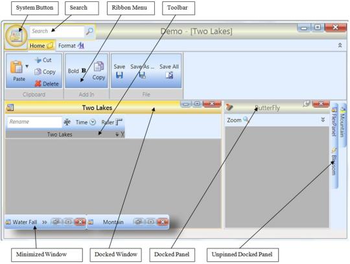
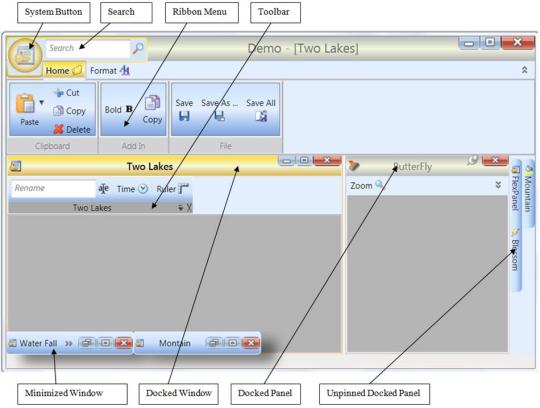
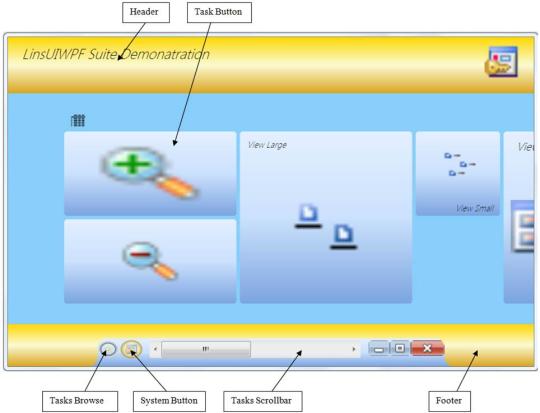
LinsUIWPF Suite is a toolset for building Windows 7/8 style like user interface for Windows Presentation Foundation application. It enhances the appearance of UI with gradient background and elegant layout. Users can easily move a Window/Panel/Toolbar and dock it anywhere they like. All tool items and tool containers (such as Context Menu, Menu, Ribbon Menu, Toolbar and Tasks Screen) are customizable. Composite Command gives users the ability to execute several commands only at one click. The Help button of a command tooltip links the command to its documentation. The Search function box helps users to use keyword to locate the functionality inside the application. Different user can export his favorite workspace layout and tool items setting as XML files. The XML files can be imported back any time.

It supports two modes, Normal and Metro, both of them supports multiple document interface (MDI) and tabbed document interface (TDI), and both can be mixed-used. Users can switch between these two modes. All controls provide a high-performance, animation, and visually appealing interface. It is very easy to create a metro screen, ribbon menu, menu, context menu, or toolbar and assign it to the main frame, a document, or a panel.

Tool items are customizable and editable. Tool item can be dragged between tool containers. The General page enable user change tool containers appearance, such as font size, face, color, style, and icon size. The Tool Container page allows user to create a new menu or a new toolbar for any panel or main frame. The Composite Commands page let user choose multi commands in any order to create a new command, which is Composite Command (CC). CC gives user the ability to execute multi-command by only one click.

It is easy to use LinsUIWPF Suite; it barely requires code change to embed it into an existing project.
screenshots

LinsUIWPF Suite Screenshots

LinsUIWPF Suite screenshot 1 LinsUIWPF Suite screenshot 2
similarSimilar Software
VFTool icon
VFTool
v 2.2
non-free
Excel Class .NET icon
Excel Class .NET
v 1
non-free
JADC  icon
JADC
v 1
free
ELCryptula ActiveX DLL icon
ELCryptula ActiveX DLL
v 1.1
non-free
SD-Tabs icon
SD-Tabs
v 1
non-free
JMS SMTP Bridge icon
JMS SMTP Bridge
v 1
free
