Works on: Windows 10 | Windows 8.1 | Windows 8 | Windows 7 | Windows 2012 SHA1 Hash: f63d3baefabc1087777c70041e193312694f391b Size: 29.75 MB File Format: exe
Rating: 2.2
out of 5
based on 23 user ratings
Publisher Website: External Link Downloads: 186 License: Demo / Trial Version
MegaPointer Premium Personal Edition is a demo software by Aureosoft and works on Windows 10, Windows 8.1, Windows 8, Windows 7, Windows 2012.
You can download MegaPointer Premium Personal Edition which is 29.75 MB in size and belongs to the software category Sales and Marketing Software. MegaPointer Premium Personal Edition was released on 2011-09-22 and last updated on our database on 2017-03-08 and is currently at version 3.
Thank you for downloading from SoftPaz! Your download should start any moment now. It would be great if you could rate and share:
Rate this software:
Share in your network:
MegaPointer Premium Personal Edition Description
MegaPointer Premium is a professional software application for multimedia presentations, interactive lessons, web conferences and diverse educational activities.
MegaPointer uses interactive vector graphic features in real time and facilitates the transmission of information, demonstrations directly on top of texts, figures, tables, graphs, animations, MS PowerPoint (or similar) presentations, and videos.
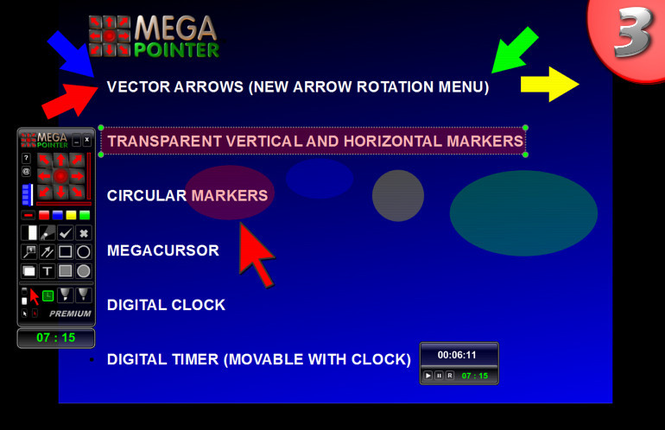
MegaPointer Premium functions are summarized below:
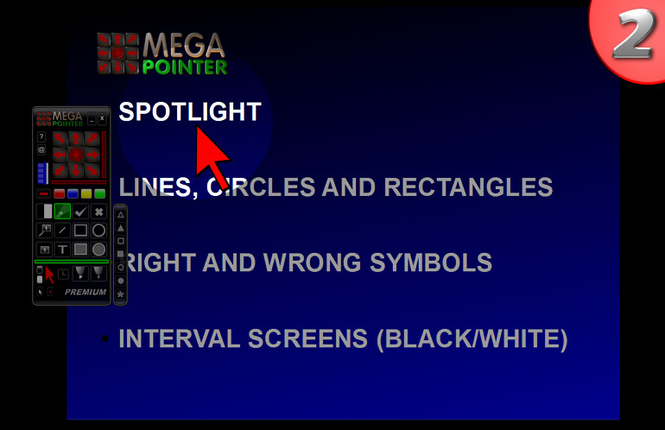
1) Adjustable Spotlight;
2) Digital Clock;
3) Digital Timer with clock (control presentation time);
4) Vector arrows with new rotation menu;
5) Transparent circle markers;
6) Transparent horizontal markers;
7) Transparent vertical markers;
8) MegaCursor in various colors for improved viewing;
9) Icon mode that can hide/show main panel anytime during a presentation.
10) Vector Gallery (7 markers);
11) Freehand on-screen drawing and writing (pen tool);
12) Highlighter pen in various colors;
13) Whiteboard Function: whiteboard, blackboard and greenboard;
14) Drawing of geometric figures: lines, arrow lines, circles, ellipses, rectangles and squares;
15) Right and wrong symbols for educational and demonstration purposes;
16) Numbering with or without associated linking lines and legends;
17) Movable on-screen text boxes (resizable with edit boxes);
18) Black or White pause screens - interval screens;
19) Shortcut list.
20) New edit/resize box for the geometric figures and markers and rotation arrow menu (easier and faster real-time editing).
Where to buy?
Last updated price and discount information 9 years agoupdate now



 Windows 7 and above
 View Screenshots(3)
 Comments
 Download





 Similar Software


 Recently Searched
 Software Categories
 Trending Software
 Like Us


