Version: 1.5 Last Updated: 13 Jun 2017 Release: 10 Sep 2012 Category: Multimedia > Audio
Rate this software:
1335 downloads
View Screenshots(2)
Comments
Download
Liked it? Tell others:
mp3HD Toolkit Details
Works on: Windows 10 | Windows 8.1 | Windows 8 | Windows 7 | Windows 2012 SHA1 Hash: d04d1b057df6243aecd5bed5c0b6b7e7d81f02e4 Size: 852.66 KB File Format: zip
Rating: 2.2
out of 5
based on 23 user ratings
Publisher Website: External Link Downloads: 1335 License: Demo / Trial Version
mp3HD Toolkit is a demo software by Technicolor and works on Windows 10, Windows 8.1, Windows 8, Windows 7, Windows 2012.
You can download mp3HD Toolkit which is 852.66 KB in size and belongs to the software category Audio. mp3HD Toolkit was released on 2012-09-10 and last updated on our database on 2017-06-13 and is currently at version 1.5.
Thank you for downloading from SoftPaz! Your download should start any moment now. It would be great if you could rate and share:
Rate this software:
Share in your network:
mp3HD Toolkit Description
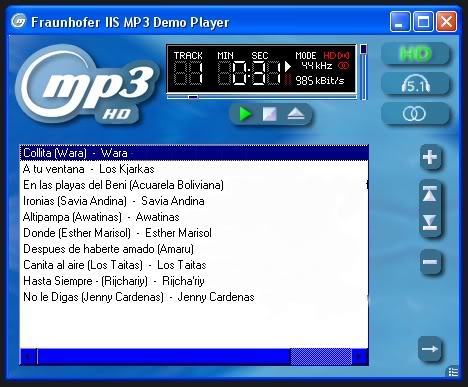
Mp3HD is a lossless audio codec delivering an archival format for storing digital audio, which has the unique benefit of being able to be played in standard mp3 on every existing mp3 decoder. Mp3HD is based on MPEG-1/MPEG-2 Layer 3, with file extension .mp3.
Key features:
Compression: An mp3HD file has 2 components. First is the standard mp3 file, which can be made using any mp3 bit rate. 192kbps is commonly used as it is virtually indistinguishable from a CD, and is a small file size. The additional data needed to create a lossless mp3HD file from the standard mp3 component is automatically calculated from the chosen mp3 bit rate. No special mp3HD settings are necessary.
Lossless format: Audio quality is equivalent to a CD (100% bit exact copy). The file size of an mp3HD song is approximately half of a CD track.
Future Proof: Mp3HD as it is bit exact to a CD can be considered an archival copy, which is future proof.
Compatibility: Mp3HD files are backward compatible and can be played on every mp3 devices
Multiple usage: Same as mp3, with more benefits: archival format, sound preservation and ultimate quality experience
Convenience: Use the same ID3 metadata as mp3 embedded track – album, artist, track, song, genre, etc.



 Windows 7 and above
 View Screenshots(2)
 Comments
 Download




 Similar Software


 Recently Searched
 Software Categories
 Trending Software
 Like Us


