Version: 1 Last Updated: 08 Mar 2017 Release: 04 Dec 2007 Category: Desktop Enhancements
Rate this software:
258 downloads
View Screenshots(3)
Comments
Download
Liked it? Tell others:
My System Tray Icon Details
Works on: Windows 10 | Windows 8.1 | Windows 8 | Windows 7 | Windows XP | Windows 2000 | Windows 2003 | Windows 2008 | Windows Vista | Windows 2012 SHA1 Hash: 28ea6594bea2d8dec0d46511d071cf9a5f8ba55a Size: 5.32 MB File Format: msi
Rating: 1.8
out of 5
based on 23 user ratings
Publisher Website: External Link Downloads: 258 License: Demo / Trial Version
My System Tray Icon is a demo software by Rtmenu.com and works on Windows 10, Windows 8.1, Windows 8, Windows 7, Windows XP, Windows 2000, Windows 2003, Windows 2008, Windows Vista, Windows 2012.
You can download My System Tray Icon which is 5.32 MB in size and belongs to the software category Desktop Enhancements. My System Tray Icon was released on 2007-12-04 and last updated on our database on 2017-03-08 and is currently at version 1.
Thank you for downloading from SoftPaz! Your download should start any moment now. It would be great if you could rate and share:
Rate this software:
Share in your network:
My System Tray Icon Description
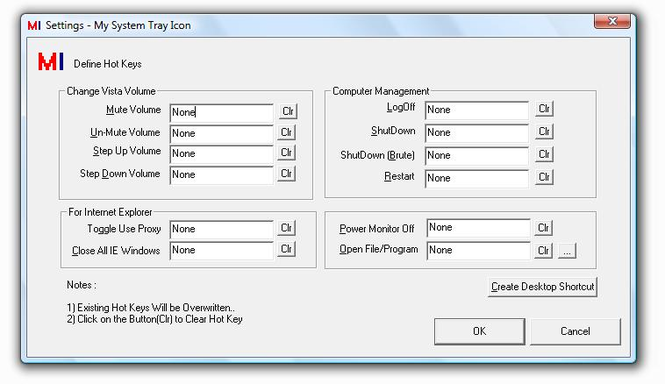
Power Monitor Off , Restart Computer , Log Off , Shut Down , Increase/Decrease Volume , Mute/Un-Mute , Run Program/Open File , Toggle Use Proxy by defining Hot Key for each/any one of them. All the features can be accesses using Right Click on System Tray Icon. Registered users can send in request to add relative feature(s). Trial Version does not have any nagging pop-ups.Registered Users Can send request to get relative feature(s) added.
Trial Version Does not have any Naggin Pop-Ups.Upgrades for Registered Users at No Extra Cost.Registered Users Can send request to get relative feature(s) added(at no extra cost). Run all features using Menu on Right Click of the System Tray Icon.Setup adds the program to run on Windows Startup.
Where to buy?
Last updated price and discount information 9 years agoupdate now



 Windows XP and above
 View Screenshots(3)
 Comments
 Download





 Similar Software
 Recently Searched
 Software Categories
 Trending Software
 Like Us

