Works on: Windows 10 | Windows 8.1 | Windows 8 | Windows 7 | Windows 2012 SHA1 Hash: 015640f81ada498607868a8c853ee70202baca57 Size: 22.72 MB File Format: exe
Rating: 2.1
out of 5
based on 23 user ratings
Publisher Website: External Link Downloads: 94 License: Demo / Trial Version
MyQuickView is a demo software by Adis, Ltd. and works on Windows 10, Windows 8.1, Windows 8, Windows 7, Windows 2012.
You can download MyQuickView which is 22.72 MB in size and belongs to the software category Image Editors Convertors Viewers. MyQuickView was released on 2012-07-31 and last updated on our database on 2017-03-08 and is currently at version 1.
Thank you for downloading from SoftPaz! Your download should start any moment now. It would be great if you could rate and share:
Rate this software:
Share in your network:
MyQuickView Description
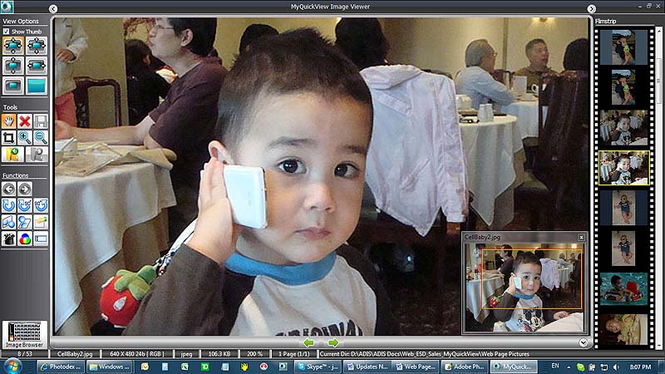
MyQuickView is a powerful yet very easy to use piece of software that allows you to efficiently manage, view and edit your entire digital photo collection in a simple and reliable manner.
With the help of this intuitive application you can easily navigate to your image folders and quickly copy or move your image files to another location, instantly modify and save the orientation of your photos (rotate clockwise and counter-clockwise) or you can even process multiple files in batch mode in order to resize, rename, enhance, add image watermarks, rotate and convert your entire digital collection. MyQuickView also allows you to organize your image folders into groups so that you can easily manage and find them at any given time.
MyQuickView comes with an efficient image viewer that allows you to display your image files in various ways and it provides you with several tools and functions in order to modify or improve your photos. You can easily crop your images, remove red eye, create a customized slideshow or add various effects and color adjustments (blur, emboss, sharpen, filter, soften and more…). This way, you can easily make any required modifications and enhancements in order to view your images in the best possible quality. The best part about MyQuickView is that, compared to other applications available on the Internet, it can efficiently be used by both novice and advanced computer users.
With MyQuickView you can easily Email images using Gmail, Hotmail and Outlook, retrieve image files located on removable devices like DVDs, quickly upload photos to facebook or you can even burn an image CD or DVD (a helpful wizard will guide you through the process so that you won't make any mistakes). And these are just some of the many great features that MyQuickView puts at your disposal.
To summarize, MyQuickView is a powerful yet very easy to use piece of software that allows you to efficiently manage, view and edit your entire digital photo collection.
Where to buy?
Last updated price and discount information 9 years agoupdate now



 Windows 7 and above
 View Screenshots(1)
 Comments
 Download





 Similar Software


 Recently Searched
 Software Categories
 Trending Software

 Like Us

