Version: 1.7 Last Updated: 26 Apr 2017 Release: 30 Jun 2014 Category: Desktop Enhancements
Rate this software:
136 downloads
View Screenshots(1)
Comments
Download
Liked it? Tell others:
OfficeTime Details
Works on: Windows 10 | Windows 8.1 | Windows 8 | Windows 7 | Windows XP | Windows 2000 | Windows 2003 | Windows 2008 | Windows Vista | Windows 2012 SHA1 Hash: f049d2a90fdc9bd33e518e64bdd16eaa725dd2b9 Size: 14.28 MB File Format: msi
Rating: 2.6
out of 5
based on 23 user ratings
Publisher Website: External Link Downloads: 136 License: Demo / Trial Version
OfficeTime is a demo software by Productive Monkey and works on Windows 10, Windows 8.1, Windows 8, Windows 7, Windows XP, Windows 2000, Windows 2003, Windows 2008, Windows Vista, Windows 2012.
You can download OfficeTime which is 14.28 MB in size and belongs to the software category Desktop Enhancements. OfficeTime was released on 2014-06-30 and last updated on our database on 2017-04-26 and is currently at version 1.7.
Thank you for downloading from SoftPaz! Your download should start any moment now. It would be great if you could rate and share:
Rate this software:
Share in your network:
OfficeTime Description
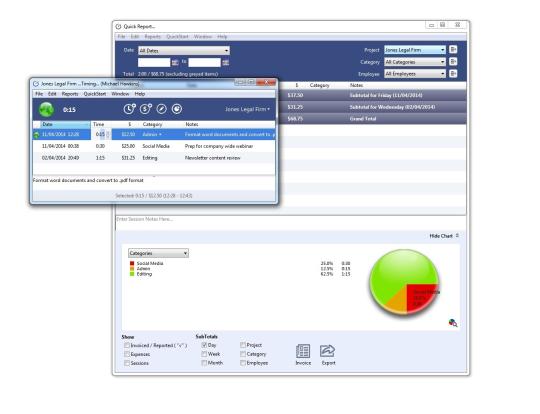
OfficeTime automatically detect how long youve been idle and subtract it or assign it to a different project and track visual history or your days in your favorite iCal calendar. OfficeTime features one click Quick Reporting to instantly see where your time has gone. Then choose more refinement and watch as the report and graphs changes in real time. Fluid reports that change as you watch are a more natural and dynamic way to interact with your data. The project supervisor can combine multiple employee files to produce powerful cross-person, team based reporting. Each employees data file can optionally be stored and accessed on a shared server drive. Now you can see at a glance the time and detail spent on each project under your supervision.
Whats new in this version:
Pie legend is sortable again
Newly created sessions can once again be rounded and after restarting OfficeTime you can still resume from the unrounded time
Now shows all projects in your menus even if you had previously imported them once with show only in reports checked and once with it unchecked.
No longer deletes your session if you press forward delete key while editing a note
No longer fails to relaunch if you had it minimized to the task bar
The play b...
Where to buy?
Last updated price and discount information 9 years agoupdate now



 Windows XP and above
 View Screenshots(1)
 Comments
 Download





 Similar Software


 Recently Searched
 Software Categories
 Trending Software
 Like Us


