Works on: Windows 10 | Windows 8.1 | Windows 8 | Windows 7 | Windows 2012 SHA1 Hash: 857135e2742cfc9489c82467a99c3028ecca2ab7 Size: 17.91 MB File Format: exe
Rating: 2.2
out of 5
based on 23 user ratings
Publisher Website: External Link Downloads: 139 License: Demo / Trial Version
Perspector Standard Edition is a demo software by Visual Exemplars Ltd and works on Windows 10, Windows 8.1, Windows 8, Windows 7, Windows 2012.
You can download Perspector Standard Edition which is 17.91 MB in size and belongs to the software category Sales and Marketing Software. Perspector Standard Edition was released on 2009-08-06 and last updated on our database on 2017-03-08 and is currently at version 4.2.
Thank you for downloading from SoftPaz! Your download should start any moment now. It would be great if you could rate and share:
Rate this software:
Share in your network:
Perspector Standard Edition Description
If you're looking for new ways to make your PowerPoint presentations stand out, Perspector will give you what you want.
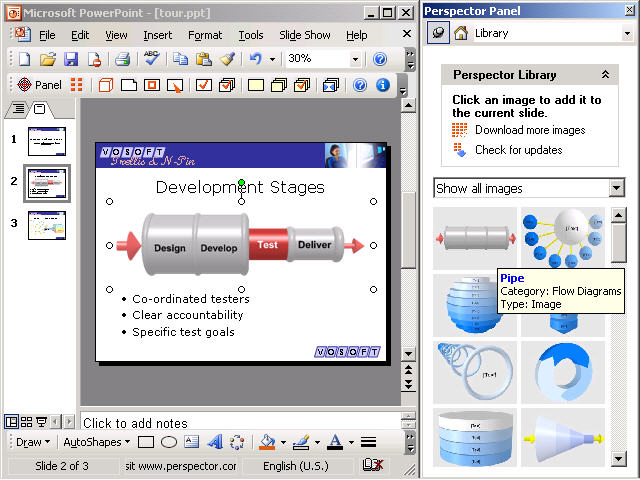
Perspector lets you add a variety of 3D effects to your slides, from individual shapes to full-blown 3D diagrams. There is a library with images in it that you can use to make an immediate difference to your presentations. If you want to make your bullet lists more interesting, try out one of the 3D lists!
Editing 3D images in Perspector is easy if you've ever used 2D shapes in PowerPoint before. It works the same way - dragging a shape moves it, dragging one of the handles resizes the shape or rotates it. If you get stuck, there are some short and snappy videos included to show you how to do these things.
Perspector is the only PowerPoint tool that lets you create 3D images. There are some PowerPoint tools that let you create 3D titles, but these don't let you create 3D images and diagrams. If you want 3D titles, Perspector can do these too.
There are 3D drawing programs such as Maya and 3ds Max that could be used to create 3D images for your presentations, but since they are designed for 3D artists they are not easy to learn. Perspector has been designed exclusively for PowerPoint users. The other 3D drawing programs also don't have the PowerPoint integration that Perspector has, so they don't let you edit your 3D image directly from inside PowerPoint. This is a really great feature of Perspector because it means the 3D effects are always at your fingertips when you are working on your presentations.
Where to buy?
Last updated price and discount information 9 years agoupdate now



 Windows 7 and above
 View Screenshots(3)
 Comments
 Download





 Similar Software


 Recently Searched
 Software Categories
 Trending Software
 Like Us


