Works on: Windows 10 | Windows 8.1 | Windows 8 | Windows 7 | Windows 2012 SHA1 Hash: c81ab506b280374c563058a464d7ef4d5f907d03 Size: 10.78 KB File Format: crx
Rating: 2.2
out of 5
based on 23 user ratings
Publisher Website: External Link Downloads: 1357 License: Free
PicMonkey is a free software by Picmonkey and works on Windows 10, Windows 8.1, Windows 8, Windows 7, Windows 2012.
You can download PicMonkey which is 10.78 KB in size and belongs to the software category Internet Applications Addons. PicMonkey was released on 2013-09-24 and last updated on our database on 2017-06-14 and is currently at version 1.4.
Thank you for downloading from SoftPaz! Your download should start any moment now. It would be great if you could rate and share:
Rate this software:
Share in your network:
PicMonkey Description
Instantly edit web page images and screenshots with PicMonkey.
The PicMonkey Chrome Extension lets you instantly grab images from any Web page and open them up in PicMonkey for editing.
Here’s how it works: click the PicMonkey icon when you’re viewing a web page. In one kajillionth of a second, every image on that page and a screenshot of the entire page appears as a tiny thumbnail in a sidebar. Select one to edit, and wah-la! PicMonkey shows up to do your bidding.
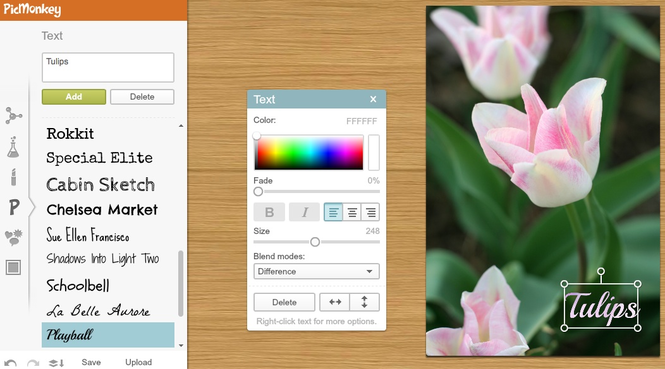
PicMonkey is a free online photo editor that says Booyah! to whatever your creative heart desires. Its lean and fast engine lets you perform basic edits, like crop and rotate, and enhance your images with luscious effects, overlays, fonts, textures, frames and touch up tools. Ridiculously easy, staggeringly gorgeous.




 Windows 7 and above
 View Screenshots(3)
 Comments
 Download






 Similar Software


 Recently Searched
 Software Categories
 Trending Software

 Like Us

