Works on: Windows 10 | Windows 8.1 | Windows 8 | Windows 7 | Windows XP | Windows 2000 | Windows 2003 | Windows 2008 | Windows Vista | Windows 2012 SHA1 Hash: 623aec3a6da8a2b8cbdc7cceebbb6f678a99a3af Size: 1.83 MB File Format: exe
Rating: 2.2
out of 5
based on 23 user ratings
Publisher Website: External Link Downloads: 1336 License: Demo / Trial Version
QVCS-Pro is a demo software by Quma Software, Inc. and works on Windows 10, Windows 8.1, Windows 8, Windows 7, Windows XP, Windows 2000, Windows 2003, Windows 2008, Windows Vista, Windows 2012.
You can download QVCS-Pro which is 1.83 MB in size and belongs to the software category File Editors. QVCS-Pro was released on 2008-02-22 and last updated on our database on 2017-06-14 and is currently at version 3.1.
Thank you for downloading from SoftPaz! Your download should start any moment now. It would be great if you could rate and share:
Rate this software:
Share in your network:
QVCS-Pro Description
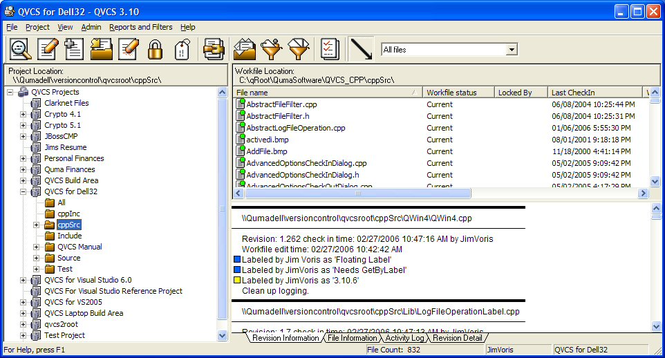
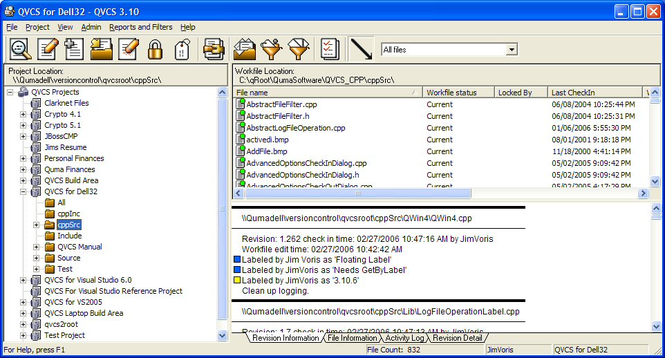
QVCS is an affordable version control system for the Windows developer. It matches more expensive products in features that are useful to small development teams, and is easy to use and administer. See at a glance which files are checked out, which files have changed since check out, who most recently changed a file, etc. Directory recursion allows you to see this for a single directory, or for an entire project. Perform common operations like check in or check out with the click of a button. QVCS supports both text and binary files.QVCS has extensive on-line help, and two separate tutorials to introduce a new user to the product.
The QVCS GUI tool (called QWin) displays the revision history of the files in a project and allows the user to sort the revision history by a number of criteria, including file status, checkin date, filename, locker, etc. QWin can filter the revision history to show only those revisions that pass the filter criteria. It can print reports for the current list of revisions. QWin allows the user to sort and filter the list of files that it displays. File filtering allows the user to limit the set of files that QWin will display and perform a operations on. Files can be filtered by file extension, label, most recent revision date, etc. QWin supports file and project level operations, so you can check out a single file, or check out all the files in a project with a few mouse clicks. QWin has support for 'file groups' so you can perform the same operation on a group of files by selecting just one of the files in the file group. This is especially useful for Delphi and Visual Basic users.
Where to buy?
Last updated price and discount information 9 years agoupdate now



 Windows XP and above
 View Screenshots(3)
 Comments
 Download





 Similar Software


 Recently Searched
 Software Categories
 Trending Software


 Like Us
