Works on: Windows 10 | Windows 8.1 | Windows 8 | Windows 7 | Windows XP | Windows 2000 | Windows 2003 | Windows 2008 | Windows 98 | Windows ME | Windows Vista | Windows 2012 SHA1 Hash: 4195463ffe1eda678e928f9e7d72acba5e83ebd5 Size: 8.91 MB File Format: exe
Rating: 2.3
out of 5
based on 23 user ratings
Downloads: 82 License: Free
SchizoCopy is a free software by FunSplash and works on Windows 10, Windows 8.1, Windows 8, Windows 7, Windows XP, Windows 2000, Windows 2003, Windows 2008, Windows 98, Windows ME, Windows Vista, Windows 2012.
You can download SchizoCopy which is 8.91 MB in size and belongs to the software category File Management. SchizoCopy was released on 2012-10-15 and last updated on our database on 2017-04-24 and is currently at version 1.1.
Thank you for downloading from SoftPaz! Your download should start any moment now. It would be great if you could rate and share:
Rate this software:
Share in your network:
SchizoCopy Description
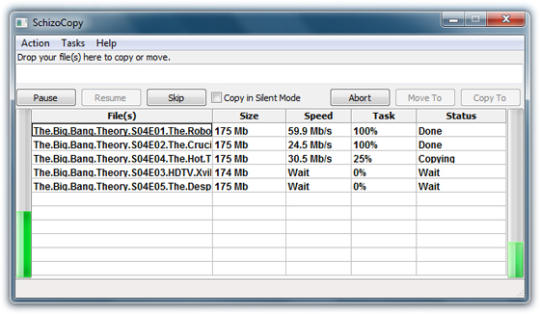
SchizoCopy is a software application for Microsoft Windows that is designed to be used to move or copy computer files. As an alternative to the Default Windows OS copy operations, it is designed to be faster and have more functionality than the native tool. SchizoCopy offers many unique offers besides providing fastest copying speed. It has an unique option for "Backup support" in case of unexpected shutdown or System exit you can always resume your ongoing Copy/Move operations. Its features are: Fully Graphic User Interface. Complete Backup support for handling files operations in case of any unexpected system Shutdown. Faster Speed and Security than Windows. Options for "Pause" and "Resume" for pausing and resuming any ongoing operations. Fully Unicode support. Options for "Copying in Silent mode" - benefit to all gamers for consuming less System RAM. Multithreading and Multiprocessing. Queue support for appending all files/folders. Optional Keyboard Binding with Windows support so you copy in the same way as you use to copy with. Windows native tool. Ctrl+C/Ctrl+X and Ctrl+V for Copy/Move and Paste. Drag and Drop support.
Whats new in this version:
Version 1.1 may include unspecified updates, enhancements, or bug fixes.



 Windows 98 and above
 View Screenshots(1)
 Comments
 Download




 Similar Software


 Recently Searched
 Software Categories
 Trending Software

 Like Us

