Version: 1.41 Last Updated: 09 Mar 2017 Release: 06 Oct 2011 Category: Internet > E-mail
Rate this software:
240 downloads
View Screenshots(3)
Comments
Download
Liked it? Tell others:
Send2 for Outlook Details
Works on: Windows 10 | Windows 8.1 | Windows 8 | Windows 7 | Windows XP | Windows 2000 | Windows 2003 | Windows 2008 | Windows ME | Windows Vista | Windows 2012 SHA1 Hash: f413082aea36e4c7a761aafcfb1c8c85076fc268 Size: 7.39 MB File Format: exe
Rating: 2.4
out of 5
based on 23 user ratings
Publisher Website: External Link Downloads: 240 License: Demo / Trial Version
Send2 for Outlook is a demo software by 4team Corporation and works on Windows 10, Windows 8.1, Windows 8, Windows 7, Windows XP, Windows 2000, Windows 2003, Windows 2008, Windows ME, Windows Vista, Windows 2012.
You can download Send2 for Outlook which is 7.39 MB in size and belongs to the software category E-mail. Send2 for Outlook was released on 2011-10-06 and last updated on our database on 2017-03-09 and is currently at version 1.41.
Thank you for downloading from SoftPaz! Your download should start any moment now. It would be great if you could rate and share:
Rate this software:
Share in your network:
Send2 for Outlook Description
The Send2 plug-in extends standard Microsoft Outlook functionality.
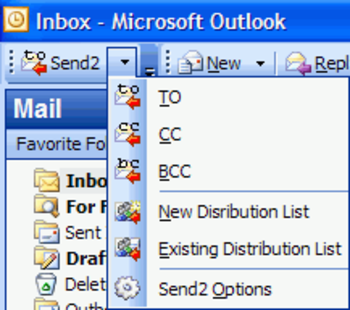
Usually, sending mass e-mails and distribution lists management takes a great deal of your time. Having e-mails in your folder, you can only reply to an e-mail or forward an e-mail. Send2 allows you to easily create a new e-mail message in response to multiple messages. Or, when you create a new message, you need to type in an address or select a contact (distribution list) after clicking the To... (Cc...) button. With the help of Send2, you can create new distribution lists and add new recipients to existing ones, picking up contacts right from the current folder.
Features:
Create distribution list and send bulk e-mail to recipients by pulling out them from selected Microsoft Outlook folders, e-mails, contacts, meetings, or tasks in one click. Plug-in integrated in Microsoft Outlook actions menu, shortcut menu, into toolbar, and right-click item menu. Add recipients to Distribution list that already exists. Add recipients from selected Outlook items or any entire folder to a new e-mail "To", "CC", or "BCC" field in one click. Feature for personalizing group e-mails - It allows you to insert the appropriate contact details - Full Name, First Name, Middle Name, Last Name, Initials, Nickname and Company - for each recipient of a group message. "Send personally" feature - The final recipient will receive no information about any of the other recipients. Recipient will see only his/her name and address in the "To" "CC", "BCC" fields (a field of your choice), as if the message has been sent to him/her only. The Send2 Options allow you to automatically flag the unsent group messages, and remove flags when these messages are sent out. Easy customizable options. Time-saving tool for routine tasks. Support for Outlook 2002, 2003, 2007, 2010
Where to buy?
Last updated price and discount information 9 years agoupdate now



 Windows ME and above
 View Screenshots(3)
 Comments
 Download





 Similar Software


 Recently Searched
 Software Categories
 Trending Software

 Like Us

