Works on: Windows 10 | Windows 8.1 | Windows 8 | Windows 7 | Windows XP | Windows 2000 | Windows 2003 | Windows 2008 | Windows Vista | Windows 2012 SHA1 Hash: ef0506bb7a0f6b2c12e21255c2e487bbd6034152 Size: 633.09 KB File Format: exe
Rating: 2.4
out of 5
based on 23 user ratings
Downloads: 272 License: Free
Talking Alarm Clock is a free software by Cinnamon Sofware and works on Windows 10, Windows 8.1, Windows 8, Windows 7, Windows XP, Windows 2000, Windows 2003, Windows 2008, Windows Vista, Windows 2012.
You can download Talking Alarm Clock which is 633.09 KB in size and belongs to the software category Clocks and Time Management. Talking Alarm Clock was released on 2011-06-23 and last updated on our database on 2017-04-23 and is currently at version 2.
Thank you for downloading from SoftPaz! Your download should start any moment now. It would be great if you could rate and share:
Rate this software:
Share in your network:
Talking Alarm Clock Description
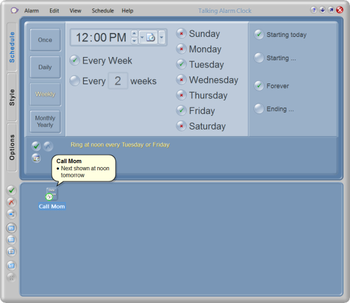
This program lets your computer remind you of important dates and events.It uses Microsoft Agent to show a talking animated alarm. The alarm can also play any sound you choose and includes a handy snooze button.An alarm can be set to go off once, daily, weekly, monthly or annually, with very flexible scheduling. Each alarm can have multiple schedules. You can configure an alarm to open files, run programs, send email, and open web pages.An icon in the Windows system tray gives quick access to the alarm clock. The New Alarm Wizard makes adding an alarm fast and easy. Talking Alarm Clocks windows are easy on the eye, with soft colors and gentle transitions. Theres also help balloon that shows a full explanation of each part of the Alarm Clock window.



 Windows XP and above
 View Screenshots(1)
 Comments
 Download





 Similar Software


 Recently Searched
 Software Categories
 Trending Software
 Like Us


