Works on: Windows 10 | Windows 8.1 | Windows 8 | Windows 7 | Windows XP | Windows 2000 | Windows 2003 | Windows 2008 | Windows Vista | Windows 2012 SHA1 Hash: 9537671fd0179f9dc79bc887ef231994a928f831 Size: 1.72 MB File Format: exe
Rating: 2.1
out of 5
based on 23 user ratings
Publisher Website: External Link Downloads: 202 License: Demo / Trial Version
Tuna Watermarking is a demo software by Tuna Watermarking and works on Windows 10, Windows 8.1, Windows 8, Windows 7, Windows XP, Windows 2000, Windows 2003, Windows 2008, Windows Vista, Windows 2012.
You can download Tuna Watermarking which is 1.72 MB in size and belongs to the software category E-mail. Tuna Watermarking was released on 2011-08-23 and last updated on our database on 2017-04-23 and is currently at version 1.
Thank you for downloading from SoftPaz! Your download should start any moment now. It would be great if you could rate and share:
Rate this software:
Share in your network:
Tuna Watermarking Description
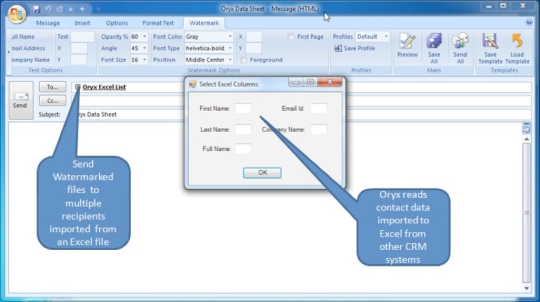
Tuna Watermarking is a plugin for MS Outlook 2010 that allows you to Watermark PDF attachments with the recipients name, company and custom verbiage. You can control every aspect of the watermark including color, size position and more. Send to 1 or 10,000 pulling from your contact list or a database of names. Customize each email using mail merge functionality. Tuna Watermarking is an easy to use document watermarking software to add visible and transparent watermarks to multiple documents in a batch. It allows you to protect your documents from unauthorized distribution using one of the included or a custom watermark or logo, which could be added on any position and size. Protect IP: Discourages people from distributing your intellectual property, propriety information and confidential documents and also prevents them from posting these documents to blogs or websites as the recipient can be easily identified. Templates: Supports watermarking templates that allow you to automatically retrieve several pdf documents stored in different locations over your network. The template stores all of the predefined watermark characteristics on a document by document basis. Batch Control: Send a periodical out to a group of recipients and Tuna Watermarking will create separate e-mails and each e-mail would have a different watermark label for each recipient. Save these documents to any Outlook folder and review and sample a few before sending out. Flexability: Include the contact name, company name, e-mail address, or any combination of the three. Use Outlook distribution lists (not server lists) or a Microsoft Excel file for maximum flexibility. Choose opaqueness, color, font size, and font style of the watermark. Outlook Integration: Seamless Outlook integration ensures the most intuitive user interface combining familiarity with functionality. Tuna Watermarking appears on Outlooks toolbar and provides the familiar interface that you are used to. Cost Benefits: The real power of the system is to send a document or group of documents to a large group. For example, you could send a periodical out to a group of 1000 recipients and Tuna Watermarking would create 1000 separate e-mails.
Where to buy?
Last updated price and discount information 9 years agoupdate now



 Windows XP and above
 View Screenshots(1)
 Comments
 Download





 Similar Software


 Recently Searched
 Software Categories
 Trending Software


 Like Us

