Version: 1 Last Updated: 14 Jun 2017 Release: 27 Feb 2007 Category: CD DVD Blu-ray Tools
Rate this software:
1394 downloads
View Screenshots(3)
Comments
Download
Liked it? Tell others:
VideoSync Details
Works on: Windows 10 | Windows 8.1 | Windows 8 | Windows 7 | Windows XP | Windows 2000 | Windows 2003 | Windows 2008 | Windows Vista | Windows 2012 SHA1 Hash: 63ccf39cbed30c97ebe74478c5554a873f1dcf91 Size: 938 bytes File Format: exe
Rating: 2.7
out of 5
based on 23 user ratings
Publisher Website: External Link Downloads: 1394 License: Demo / Trial Version
VideoSync is a demo software by Tmpg Inc. and works on Windows 10, Windows 8.1, Windows 8, Windows 7, Windows XP, Windows 2000, Windows 2003, Windows 2008, Windows Vista, Windows 2012.
You can download VideoSync which is 938 bytes in size and belongs to the software category CD DVD Blu-ray Tools. VideoSync was released on 2007-02-27 and last updated on our database on 2017-06-14 and is currently at version 1.
Thank you for downloading from SoftPaz! Your download should start any moment now. It would be great if you could rate and share:
Rate this software:
Share in your network:
VideoSync Description
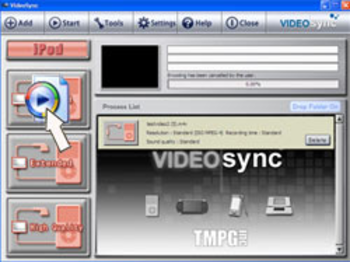
VideoSync is Any Video. Anywhere. Anytime. Take your favorite videos with you, wherever you go, with no hassle. VideoSync lets you drag and drop your favorite videos from your PC to your PSP™, iPod, and PDA (which uses Windows Mobile 5.0). Enjoy your videos wherever you want!
Main Features:
1. All-in-1 Sync Tool
VideoSync lets you transfer your videos to your PSP™, iPod, & PDAs, all within one program. There is no need to buy multiple software titles for each mobile device. Now you can enjoy the convenience of choosing which mobile device you would like to transfer your video to, all with the ease of a simple click.
2. Drag, Drop, Go!
VideoSync allows you to view any video anywhere, anytime. With its user friendly interface, transferring your videos to your favorite mobile device has never been easier. Simply drag and drop your videos to your mobile device in no time.
3. Automatic Encoding
Encode your videos while you sleep or aren’t at your computer! The Drop Folder lets you queue multiple video files to be encoded at a desired time set by you, you can even have multiple file formats going to multiple devices.
4. Easy File Management
Manage your PSP™ memory card and your iTunes video playlists seamlessly. VideoSync helps you to keep all your data organized so there’s no confusion of what’s on your device.
5. Conserve space on your Mobile Device
You can choose the quality of the individual videos you want to sync with your mobile device. This allows you to conserve space and fit more videos on your device, or display them at their optimal viewing quality.
Where to buy?
Last updated price and discount information 9 years agoupdate now



 Windows XP and above
 View Screenshots(3)
 Comments
 Download





 Similar Software


 Recently Searched
 Software Categories
 Trending Software

 Like Us


