Works on: Windows 10 | Windows 8.1 | Windows 8 | Windows 7 | Windows XP | Windows 2000 | Windows 2003 | Windows 2008 | Windows Vista | Windows 2012 SHA1 Hash: 42e7209171d8771b7ce02b2faef117bbc85e9aa5 Size: 38.09 MB File Format: exe
Rating: 2.3
out of 5
based on 23 user ratings
Publisher Website: External Link Downloads: 1221 License: Demo / Trial Version
Xilisoft AVCHD Converter is a demo software by Xilisoft and works on Windows 10, Windows 8.1, Windows 8, Windows 7, Windows XP, Windows 2000, Windows 2003, Windows 2008, Windows Vista, Windows 2012.
You can download Xilisoft AVCHD Converter which is 38.09 MB in size and belongs to the software category Audio CD DVD Burning. Xilisoft AVCHD Converter was released on 2013-02-26 and last updated on our database on 2017-04-25 and is currently at version 7.7.
Thank you for downloading from SoftPaz! Your download should start any moment now. It would be great if you could rate and share:
Rate this software:
Share in your network:
Xilisoft AVCHD Converter Description
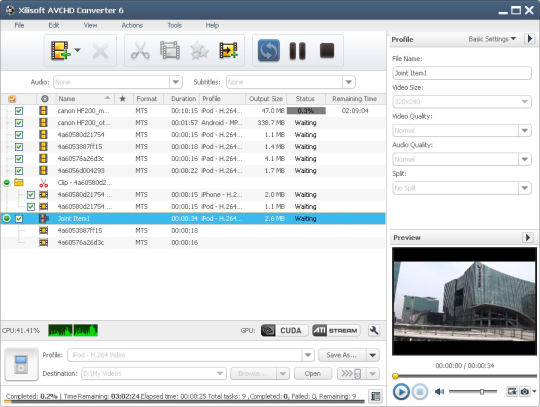
Xilisoft AVCHD Converter can help you to convert AVCHD videos in formats of MTS, M2TS, MOD and HDV to the most common videos and HD videos. Whats new: 1.Supports ATI Stream encoding technology 2.Transfers output files to iPad/iPhone 4/iPad/PSP/iTunes directly. Features: 1.Support most AVCHD camcorders in mainstream, such as Sony, Canon, Panasonic, JVC, Hitachi AVCHD camcorder and so on. 2.Convert MTS, M2TS, MOD and HDV AVCHD videos to HD videos in format of MPEG-2 HD, MPEG-4 TS HD, MPEG-2 TS HD, Quick Time HD, WMV HD and to common videos like AVI, MPEG, WMV, DivX, MP4, RM, MOV, XviD, 3GP, FLV, SWF and etc.with great quality reserved 3.Enjoy watching AVCHD videos on various multi-media devices like iPod touch, iPhone, Apple TV, PS3, PSP, Zune, Xbox and etc. 4.Extract audios from AVCHD videos to MP3, WMA, WAV, RA, M4A, AAC, AC3, OGG format music for enjoying them on various media players. 5.Enables you to clip video segments you like and merge them together to make a new video as you want. 6.Crop video frame to define the playing area; remove black edge, commercial logo or other else you dont want to keep. 7.Add special artistic effects to the outputted videos. Add subtitle to the video to your preference, authorize your video with stylish watermark, and attach Snowflake, Mosaic, Sand, Old Film and other artistic effects to make your video impressive. 8.A wide range of parameters are provided to adjust the output effects, including bit rate, sample rate, frame rate, codec, resolution, channel and so on. 9.Allows you to output one source AVCHD video to different profiles simultaneously for diverse usage. Preview source AVCHD video in the built-in player and even view the source and the modified video side by side to check the added effects. Capture snaps in preview and save them to BMP, GIF, JPEG, PNG format pictures. 10.Bitrate calculator is offered to compute accurate file size. 11.Background running, post-task actions and multi-language interfaces.
Where to buy?
Last updated price and discount information 9 years agoupdate now



 Windows XP and above
 View Screenshots(1)
 Comments
 Download





 Similar Software


 Recently Searched
 Software Categories
 Trending Software

 Like Us


