Works on: Windows 10 | Windows 8.1 | Windows 8 | Windows 7 | Windows XP | Windows 2000 | Windows 2003 | Windows 2008 | Windows ME | Windows Vista | Windows 2012 SHA1 Hash: 679c8fc2b09bdb87b063957c01e7b6d44ab685a7 Size: 27.68 MB File Format: exe
Rating: 2.5
out of 5
based on 23 user ratings
Publisher Website: External Link Downloads: 1253 License: Demo / Trial Version
Xilisoft CD Ripper is a demo software by Xilisoft.com and works on Windows 10, Windows 8.1, Windows 8, Windows 7, Windows XP, Windows 2000, Windows 2003, Windows 2008, Windows ME, Windows Vista, Windows 2012.
You can download Xilisoft CD Ripper which is 27.68 MB in size and belongs to the software category Hard Disk and CD DVD BluRay Utilities. Xilisoft CD Ripper was released on 2011-08-16 and last updated on our database on 2017-06-14 and is currently at version 6.3.
Thank you for downloading from SoftPaz! Your download should start any moment now. It would be great if you could rate and share:
Rate this software:
Share in your network:
Xilisoft CD Ripper Description
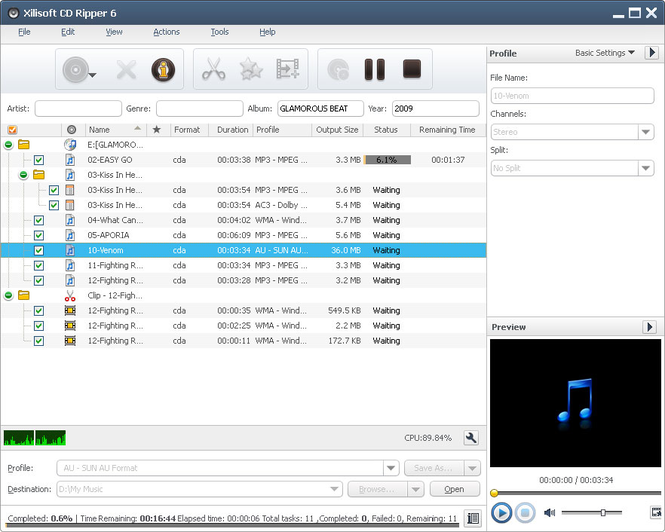
High-quality CD ripping software, Xilisoft CD Ripper rips CD to nearly all audio formats MP3, WMA, WAV, AAC, FLAC, OGG, APE and many others, making CDs available on different music players. It also allows you to rip one audio track to multiple format music files at one go, split tracks, clip music segments, set audio effects such as fade-in/out, normalize, band pass, chorus, flanger, echo and speed, and do many more customizations.
New features:
1.Support display and edit ID3 V2 information (users can attach cover, lyric and etc information for the music file).
2.Add more profiles.
3.Retrieve general information of CDs.
4.Utilize installer to reduce the installation time.
Features:
1.Rip CD to audio files of different formats including MP3, WMA, WAV, AAC, FLAC, OGG, APE.
2.Rip multiple CD tracks to audio formats at once; rip one track to multiple formats simultaneously.
3.Options to transfer audio files to iPod, iPhone and PSP directly after ripping.
4.Add and adjust fade-in, fade-out, volume normalize, band pass, chorus, flanger, echo and speed effects to your audio tracks.
5.Split your audio tracks according to split size or duration you choose or customize prior to ripping.
6.Extract multiple audio segments you want from CD tracks for ripping.
7.Make adjustment of the output parameters to customize the outputted audio; edit ID3 tag info of your audio tracks.
8.Rip CDs with multiple CPU cores and multiple threads for maximum CD ripping speed.
9.Ability to work in the background to spare CPU resources for others.
10.Auto-exit the application, shut down, hibernate, stand by system, or do nothing after ripping to keep you from waiting in front your computer.
11.Comes with English, German, Spanish, French, Japanese and Chinese interface languages.
Where to buy?
Last updated price and discount information 9 years agoupdate now



 Windows ME and above
 View Screenshots(3)
 Comments
 Download





 Similar Software


 Recently Searched
 Software Categories
 Trending Software


 Like Us


