Works on: Windows 10 | Windows 8.1 | Windows 8 | Windows 7 | Windows XP | Windows 2000 | Windows 2003 | Windows 2008 | Windows Vista | Windows 2012 SHA1 Hash: d07867e0d92f92ee3686d5c748ad08140d3fa66d Size: 9.58 MB File Format: exe
Rating: 2.1
out of 5
based on 23 user ratings
Publisher Website: External Link Downloads: 1561 License: Demo / Trial Version
Xoctave is a demo software by D&G Computing and works on Windows 10, Windows 8.1, Windows 8, Windows 7, Windows XP, Windows 2000, Windows 2003, Windows 2008, Windows Vista, Windows 2012.
You can download Xoctave which is 9.58 MB in size and belongs to the software category Programming. Xoctave was released on 2012-11-30 and last updated on our database on 2017-04-24 and is currently at version 3.
Thank you for downloading from SoftPaz! Your download should start any moment now. It would be great if you could rate and share:
Rate this software:
Share in your network:
Xoctave Description
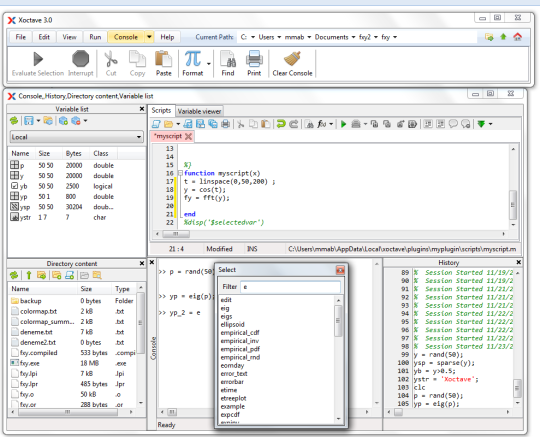
Xoctave is an easy-to-use integrated technical computing shell environment for GNU Octave. It encapsulates GNU Octave using pipes and provides a complete technical computing environment. It has many capabilities and can work on many operating systems. Xoctave is multilingual and any language can be added easily. Xoctave is based on Free Pascal, Lazarus, LCL programming language and integrated development environments (IDEs). Xoctave connects to GNU Octave via pipes and does not posses GNU Octave installed in the initial installation package. GNU Octave should be downloaded and installed separately. This brings a great flexibility since GNU Octave can be updated separately. You can watch the introduction to Xoctave video tutorials for an overview of the major functionality at Xoctave youtube channel.Xoctave has several windows and properties includingIntegrated Development Environment (IDE) Windows: Main Xoctave windowConsole: Where direct interaction with Octave takes place.Script Editor: Where users can create, run or debug the scripts.History: Where Xoctave holds commands history which is separate from Octaves core history.Variable Lister:Where current variable list in the Octave memory be viewed.Variable Viewer:Where users can reach detailed information of the selected variable.Directory Content Viewer: Users can control the contents of the current directory files and folders Package Viewer:Where users can install, uninstall and view Octave packages.Paths Viewer:Where Octave search paths can be viewed, added, and removed.Plug-ins:Where Xoctave plug-ins can be installed, uninstalled and viewed.
Where to buy?
Last updated price and discount information 9 years agoupdate now



 Windows XP and above
 View Screenshots(1)
 Comments
 Download





 Similar Software


 Recently Searched
 Software Categories
 Trending Software

 Like Us

