Works on: Windows 10 | Windows 8.1 | Windows 8 | Windows 7 | Windows XP | Windows 2000 | Windows 2003 | Windows 2008 | Windows Vista | Windows 2012 SHA1 Hash: bfe6bc3e419eb3fcc9c633e9314a3f33af50ea82 Size: 11.05 MB File Format: zip
Rating: 2.1
out of 5
based on 23 user ratings
Publisher Website: External Link Downloads: 223 License: Demo / Trial Version
Access Object Navigator is a demo software by Crosoft Systems and works on Windows 10, Windows 8.1, Windows 8, Windows 7, Windows XP, Windows 2000, Windows 2003, Windows 2008, Windows Vista, Windows 2012.
You can download Access Object Navigator which is 11.05 MB in size and belongs to the software category Databases Tools. Access Object Navigator was released on 2008-08-28 and last updated on our database on 2017-02-16 and is currently at version 3.5.
Thank you for downloading from SoftPaz! Your download should start any moment now. It would be great if you could rate and share:
Rate this software:
Share in your network:
Access Object Navigator Description
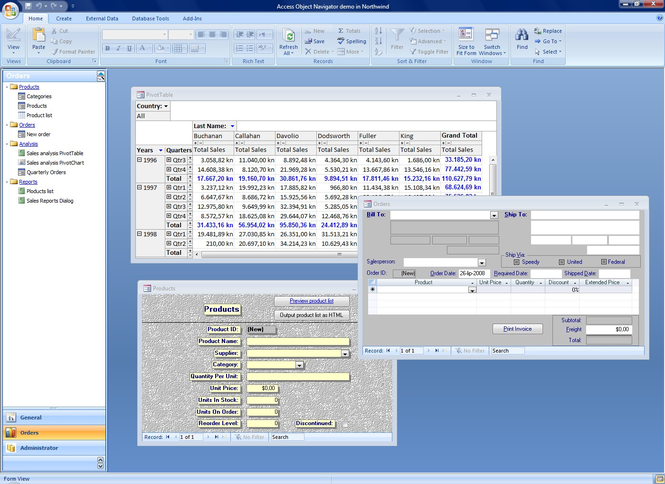
Access Object Navigator is Microsoft Access application (add-in) that helps you to create professional looking navigation menu similar to those in Microsoft Outlook and Microsoft Dynamics NAV.
Thanks to Access Object Navigator you can forget all about the Access switchboards. Your applications will look professional. With a few clicks you will have your objects available in the Access Object Navigator without having to make even one line of code.
Access Object Navigator is not just navigation system for Microsoft Access applications, but it also has many useful built-in features.
Here are some key features of Access Object Navigator::
- Just install it and it is ready for use,
- Organize all of your objects easily,
- Easy navigation to the object,
- Run functions from Navigator,
- Open objects in form you like (ex: form acNormal - acFormAdd - acDialog),
- Manage user permissions through linked table or ADO connection,
- Add up to 10 buttons,
- Add unlimited number of main nodes and sub-nodes,
- Write user help for each node and sub-node in the menu,
- Make your Navigator multi-language,
- Change the skin of your Navigator,
- Create your own skins for the Navigator.
Access Object Navigator is what you need to rise your Access applications to a higher level.
Supported versions:
Access 2000
Access 2002
Access 2003
Access 2007
Where to buy?
Last updated price and discount information 9 years agoupdate now



 Windows XP and above
 View Screenshots(3)
 Comments
 Download





 Similar Software


 Recently Searched
 Software Categories
 Trending Software


 Like Us
