Works on: Windows 10 | Windows 8.1 | Windows 8 | Windows 7 | Windows XP | Windows 2000 | Windows 2003 | Windows 2008 | Windows ME | Windows Vista | Windows 2012 SHA1 Hash: 7b3ffb64147ee92b20c5636a04491b6bc84269f3 Size: 153.44 KB File Format: exe
Rating: 2.5
out of 5
based on 23 user ratings
Downloads: 222 License: Free
Calcute is a free software by Big Tick and works on Windows 10, Windows 8.1, Windows 8, Windows 7, Windows XP, Windows 2000, Windows 2003, Windows 2008, Windows ME, Windows Vista, Windows 2012.
You can download Calcute which is 153.44 KB in size and belongs to the software category Home and Education. Calcute was released on 2011-08-24 and last updated on our database on 2017-03-01 and is currently at version 11.5.
Thank you for downloading from SoftPaz! Your download should start any moment now. It would be great if you could rate and share:
Rate this software:
Share in your network:
Calcute Description
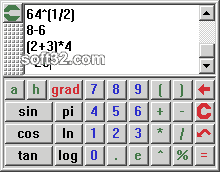
Free and Compact yet Capable Tape Calculator. More advanced than standard calculators, this is an expression evaluator that lets you process arbitrarily complex numeric expressions like:
-ln(1+2)*3% + sin(4 5\6)^7 to hex
-hex'0.FBA16476611D
As shown in this example, you can even enter an exact fractional value like 4 5\6 instead of a decimal approximation like 4.8333333333... Arithmetic software routines are used to prevent common rounding errors associated with computer hardware. Many scientific functions are supported: logarithms and exponents, trigonometric and hyperbolic functions, normal and inverse. Supports binary, octal and hexadecimal numeric bases.
In multi-line edit mode all past expressions and results are retained on the tape so you can edit previous work, recalculate it, cut and paste directly on the tape or other documents, save your work to a file automatically or manually, restore it later and resume working where you left off. Use compact single-line mode to shrink Calcute down to a tiny one-line utility stashed in a corner of your screen. Or use its more flexible multi-line editing mode: stretch it into a long calculator tape of any size or maximize it to full screen for complete multi-line editing flexibility. Since all past calculations are retained you can modify them and recalculate them individually at will.
Select any font available on your system, in any size. Also adjust the button size separately to suit your preferences. Show or hide the buttons: show the keypad to click with a mouse or hide it to save desktop space and enter your calculations using the keyboard. You can swap the use of the period and comma in order to use international numeric notation. You can group whole digits in sets of three or not. Enable the always-on-top mode to keep Calcute visible at all times. Select a snap-on screen position to your preferred starting location or retain the last position. All details are described in the included online help file.




 Windows ME and above
 View Screenshots(3)
 Comments
 Download






 Similar Software


 Recently Searched
 Software Categories
 Trending Software
 Like Us

