Works on: Windows 10 | Windows 8.1 | Windows 8 | Windows 7 | Windows XP | Windows 2000 | Windows 2003 | Windows 2008 | Windows Vista | Windows 2012 SHA1 Hash: 37c7b47f9038ba33ac0e4745b50251ebe5d0e3cd Size: 6.8 MB File Format: exe
Rating: 2.4
out of 5
based on 23 user ratings
Publisher Website: External Link Downloads: 262 License: Demo / Trial Version
Classic Menu for Access 2010 is a demo software by Addintools and works on Windows 10, Windows 8.1, Windows 8, Windows 7, Windows XP, Windows 2000, Windows 2003, Windows 2008, Windows Vista, Windows 2012.
You can download Classic Menu for Access 2010 which is 6.8 MB in size and belongs to the software category Other Office Tools. Classic Menu for Access 2010 was released on 2012-07-03 and last updated on our database on 2017-02-24 and is currently at version 5.
Thank you for downloading from SoftPaz! Your download should start any moment now. It would be great if you could rate and share:
Rate this software:
Share in your network:
Classic Menu for Access 2010 Description
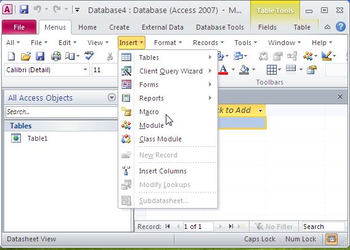
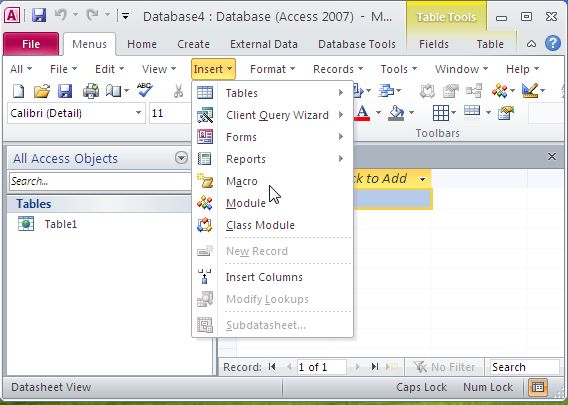
Classic Menu for Access 2010, an Office add-in designed for Microsoft Access 2010, brings the menus and toolbars of Access 2003 into the Ribbon of Microsoft Access 2010, adds a "Menus" tab at the far left of the menu bar and allows you to work with Access 2010 as if it were Access 2003.
All classic menu items of Access 2003 are well displayed as a group in the tool bar of the Ribbon, while all new features and commands of Microsoft Access 2010 are added to the classic style interface.
The software allows you to work with Access 2010 as if it were Access 2003. It shows the familiar classic menus and toolbars on the ribbon of Microsoft Access 2010. If you were using Access 2003 before, you don't need training or tutorials after upgrading to Microsoft Access 2010 with this add-in now.
User can browse the whole menus with keyboard shortcuts (insert Q into the original shortcuts of Office 2003. For example: press Alt + T to open the "Tools" menu in Access 2003, you just need to press Alt, Q, T to open the "Tools" menu in Access 2010).
The software supports all languages that are supported by Microsoft Access 2010: English, French, German, Italian, Spanish, Portuguese, Japanese, Dutch, Chinese, and more. It automatically shows the menus and toolbars in the language of your Microsoft Office 2010.
Fully compatible with Windows 7 32/64, Vista 32/64, X 32/64, Windows 2003 and 2008 Server.
You can enable or disable the classic menus and toolbars in an easy way. And the Classic Menu Manage center can help you quickly configure the setting.
Easy install and uninstall.
Easy to show or hide tabs of Ribbon.
The Access 2010 build-in tabs and groups on the ribbon are available at all times.
The Classic Menu for Microsoft Access 2010 is very stable and strong.
Where to buy?
Last updated price and discount information 9 years agoupdate now



 Windows XP and above
 View Screenshots(3)
 Comments
 Download





 Similar Software


 Recently Searched
 Software Categories
 Trending Software


 Like Us


