Version: 3.5 Last Updated: 06 Mar 2017 Release: 07 Aug 2009 Category: CD DVD Blu-ray Tools
Rate this software:
1279 downloads
View Screenshots(3)
Comments
Download
Liked it? Tell others:
Dicsoft DVD to iPod Converter Details
Works on: Windows 10 | Windows 8.1 | Windows 8 | Windows 7 | Windows XP | Windows 2000 | Windows 2003 | Windows 2008 | Windows Vista | Windows 2012 SHA1 Hash: 10c9e67d2d027dca531fb59c81292103582792a0 Size: 367.23 KB File Format: exe
Rating: 2.4
out of 5
based on 23 user ratings
Publisher Website: External Link Downloads: 1279 License: Demo / Trial Version
Dicsoft DVD to iPod Converter is a demo software by Dicsoft.com and works on Windows 10, Windows 8.1, Windows 8, Windows 7, Windows XP, Windows 2000, Windows 2003, Windows 2008, Windows Vista, Windows 2012.
You can download Dicsoft DVD to iPod Converter which is 367.23 KB in size and belongs to the software category CD DVD Blu-ray Tools. Dicsoft DVD to iPod Converter was released on 2009-08-07 and last updated on our database on 2017-03-06 and is currently at version 3.5.
Thank you for downloading from SoftPaz! Your download should start any moment now. It would be great if you could rate and share:
Rate this software:
Share in your network:
Dicsoft DVD to iPod Converter Description
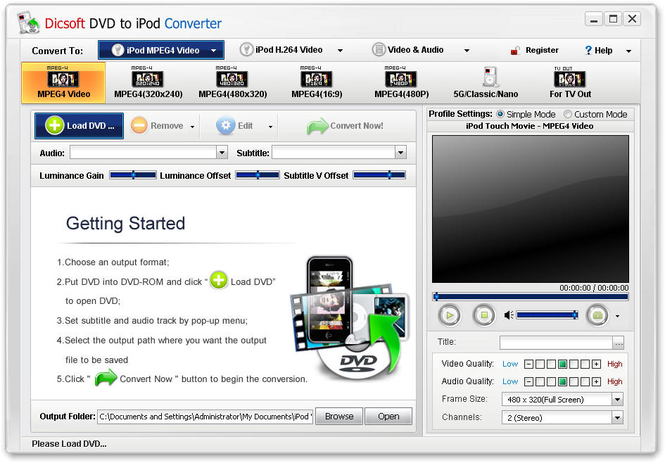
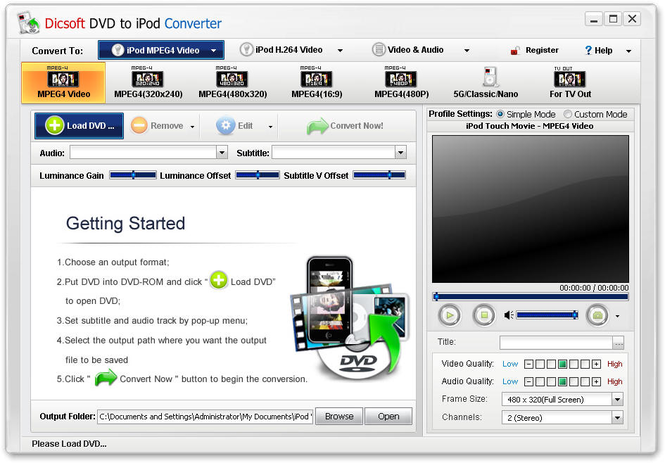
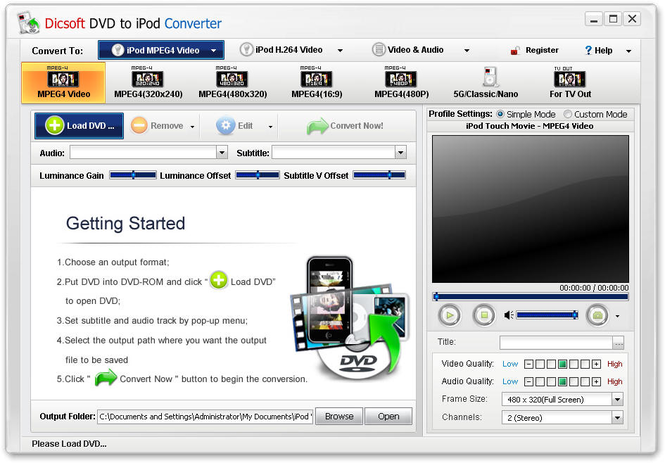
Dicsoft DVD to iPod Converter is the most versatile and quite simply converter. It's never been so easy to copy a DVD and watch movies on your iPod. Using video fast encoding technology that fully utilises dual and quad core CPU's to create the highest quality MPEG4 and H.264 codec video possible, the conversion process is at incredibly high speed and remarkable quality. Besides it is easy-to-use both to novices and professionals.
Main features:
1.Support almost any kinds of DVD format to iPod which can be played on iPod.
2.Support DVD to AAC and MP3 audio conversion.
3.Supports Pod classic, iPod touch, iPod nano and iPod shuffle.
4.Convert from any position to any position of a DVD to iPod.
5.As we know MPEG-4 is very popular and is supported by most of software. But H.264 can give you higher quality than MPEG-4 with the same file size.
6.Crop black bar off oroginal DVD.
7.Rich video format settings are provided, including video bitrate, frame size, frame rate and audio bitrate, sample rate, channel.
8.User-friendly interface without any complicated settings.
9.supports conversion in batch and allows you to convert more than one title at one time.
10.Support preview function. User can preview before ripping to check if you chose the right title, audio track and subtitle.
11.When you choose this option, the program will shut down your computer after the conversion done.
12.High converting speed and excellent output quality.
Where to buy?
Last updated price and discount information 9 years agoupdate now



 Windows 2000 and above
 View Screenshots(3)
 Comments
 Download





 Similar Software


 Recently Searched
 Software Categories
 Trending Software

 Like Us

