Works on: Windows 10 | Windows 8.1 | Windows 8 | Windows 7 | Windows XP | Windows 2000 | Windows 2003 | Windows 2008 | Windows ME | Windows Vista | Windows 2012 SHA1 Hash: 8beace00a547cfedf8132d0cb913b930a9e914f0 Size: 1.32 MB File Format: zip
Rating: 2.0
out of 5
based on 23 user ratings
Publisher Website: External Link Downloads: 133 License: Demo / Trial Version
eRubric Assistant is a demo software by Egrading Solutions and works on Windows 10, Windows 8.1, Windows 8, Windows 7, Windows XP, Windows 2000, Windows 2003, Windows 2008, Windows ME, Windows Vista, Windows 2012.
You can download eRubric Assistant which is 1.32 MB in size and belongs to the software category Home and Education. eRubric Assistant was released on 2010-09-28 and last updated on our database on 2017-04-16 and is currently at version 1.65.
Thank you for downloading from SoftPaz! Your download should start any moment now. It would be great if you could rate and share:
Rate this software:
Share in your network:
eRubric Assistant Description
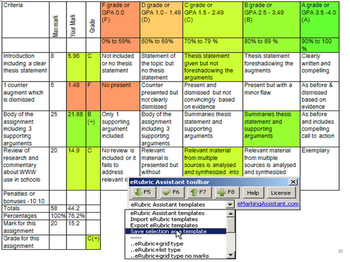
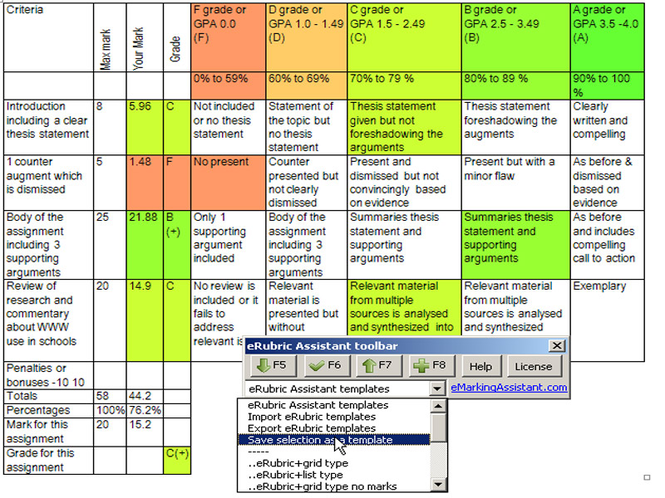
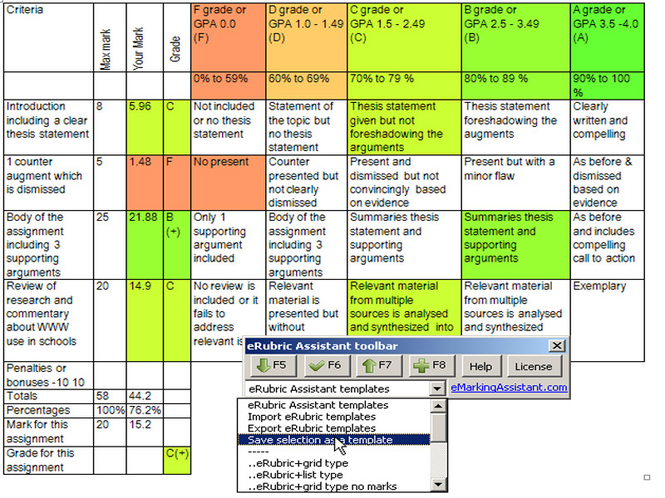
eRubric Assistant helps teachers create and use automated marking rubrics allowing you to use function keys or toolbar buttons to highlight performance standards, record, increase or decrease marks, and then add and rescale the marks. eRubrics are created as Word tables with criteria listed vertically in the first column and the maximum marks for each criterion listed in the second column. The first row contains the grades e.g. "A, B, or C or High Distinction, Credit, Fail or demonstrated, not yet demonstrated" and the second contains mark ranges for these grades e.g. "60% to 69%". The body of the eRubric contains performance standards for each of the criterion e.g. "The introduction contains a clear thesis statement and foreshadowed 3 supporting arguments." Markers and graders can quickly complete the eRubric by clicking in cells for the assessed performance standard and then pressing on of the following function keys or toolbar buttons. F6 will select the standard and calculate the mark, F5 and F6 will decrease or increase the mark. F8 will total and rescale the marks and then covert it to a grade. Automated eRubrics can be distributed to and used by markers or graders who do not have the eRubric Software. The eRubric Assistant site at http://eMarkingAssistant.com contains demonstration videos and sample eRubrics. eRubric Assistant can be easily installed into any version of Microsoft Word for Windows in less than a minute. Once installed it shows floating toolbars which operate in exactly the same way in all versions of Word. The eMarking Assistant site contains several videos and guided tours demonstrating the use of eRubric Assistant and creating and using the automated marking rubrics. The $10 license will be easily repaid in time savings in the fist week.
Where to buy?
Last updated price and discount information 9 years agoupdate now



 Windows ME and above
 View Screenshots(2)
 Comments
 Download





 Similar Software


 Recently Searched
 Software Categories
 Trending Software

 Like Us


