Works on: Windows 10 | Windows 8.1 | Windows 8 | Windows 7 | Windows 2012 SHA1 Hash: 9c9f6716b61ff77abece151fdd6fd0efb60520fc Size: 2.02 MB File Format: zip
Rating: 1.8
out of 5
based on 23 user ratings
Publisher Website: External Link Downloads: 239 License: Demo / Trial Version
FontMassive is a demo software by Fontutilities and works on Windows 10, Windows 8.1, Windows 8, Windows 7, Windows 2012.
You can download FontMassive which is 2.02 MB in size and belongs to the software category Cursors. FontMassive was released on 2011-09-09 and last updated on our database on 2017-04-17 and is currently at version 2.
Thank you for downloading from SoftPaz! Your download should start any moment now. It would be great if you could rate and share:
Rate this software:
Share in your network:
FontMassive Description
FontMassive - font manager and viewer
Tasks
* Displaying fonts as a list.
* Symbols table.
* Distribution of font files into folders.
* Installing fonts into the system.
* Deleting fonts from the system (To do this just open the folder "Fonts" in FM and delete the file - Shift+Del).
Properties
* Working with formats: TrueType (.ttf), OpenType (.otf), PostScript Type1 (.pfm + .pfb), .fon.
* Previewing fonts without installation from any source (folder, CD/DVD-ROM, Network).
* Filling lists very quickly (working with lists is already possible, it just continues to be added).
* Opening Subfolders. For example, when dragging from the Explorer hold Ctrl.
* Large quantity of sort variants (for example, the width of the text -helps "by eye" to find similar fonts).
* Warning when deleting system fonts.
* Export to images (including, to PNG with alpha-canals).
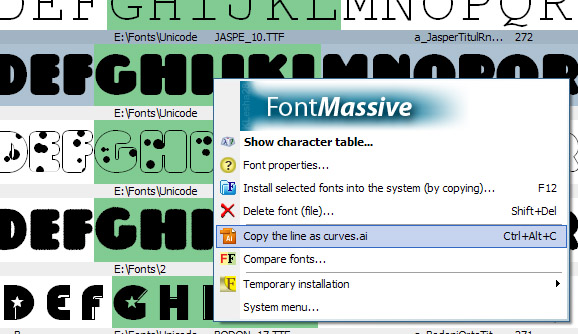
* Copying drawings to curves in Adobe Illustrator Format.
* Viewing curved symbols -at the same time able to choose from the list (Ctrl+Alt + click).
* Own folder tree.
* Favorite-folder.
* Folder history.
* Indexing folders - for opening extra font styles (if available).
* Visual comparison panel.
* Comparing "snapshots" of installed fonts after the installation.
* Grouping /Highlighting with attached styles.
* Working without installing.
* Ability to configure elements displayed in the list.
Where to buy?
Last updated price and discount information 9 years agoupdate now



 Windows 7 and above
 View Screenshots(1)
 Comments
 Download





 Similar Software


 Recently Searched
 Software Categories
 Trending Software


 Like Us

