


 Windows XP and above
| Rate this software: | |
| 223 downloads | |
 View Screenshots(1)
 Comments
 Download




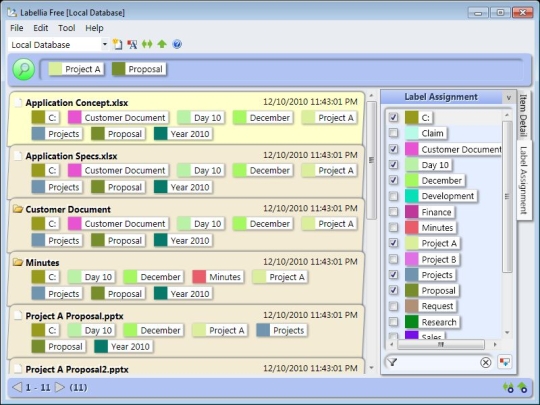
Have you experienced problems like you couldnt find a file or you couldnt decide which folder you should store a file to and so on? These kind of things, combined, waste your time and your companys time enormously. Labellia Information Manager Free ("Labellia") gives you a solution to these problems by managing information with "labels". Label is same as Tag and you can put any number of labels on each file. You can classify files on many aspects by labels, not one hierarchy of folders. So you can find a specific file much easier even if there are many similar folders and you can store a file to any folder you like. Also you can put labels on folders, Internet addresses (URLs) and offline items.
Labellia has the following features: Labeling by Folder Names: When you are using a large number of files, putting labels on each file is very hard and boring work. Labellia can put labels on files and folders based on folder names automatically. So you dont need to put them by yourself. Keyword Labeling: Keyword Labeling is another feature of automatic labeling. By using this feature, an item (file/folder/Internet address/Offline item) which has a specific keyword is automatically put labels which you specify. Easy Search--Refine the search condition: If you can use only one label to search an item, as you manage many items by labels, it becomes difficult to find it because many items hit. In Labellia, you can use the combination of labels you select. Also only existing combinations are shown, so you can "pinpoint" a specific item.

| $34 | Click the link to buy | Buy |
 Similar Software


 Recently Searched
 Software Categories
 Trending Software

 Like Us

Free Windows software, games, themes and wallpapers with direct download links since 2011.

