Works on: Windows 10 | Windows 8.1 | Windows 8 | Windows 7 | Windows 2008 | Windows Vista | Windows 2012 SHA1 Hash: a97763fc752191ec20fabc03ca71a397bb70566b Size: 107.47 KB File Format: zip
Rating: 2.2
out of 5
based on 23 user ratings
Downloads: 191 License: Free
QuickAdmin is a free software by MaiSoft and works on Windows 10, Windows 8.1, Windows 8, Windows 7, Windows 2008, Windows Vista, Windows 2012.
You can download QuickAdmin which is 107.47 KB in size and belongs to the software category Hard Disk and CD DVD BluRay Utilities. QuickAdmin was released on 2014-02-23 and last updated on our database on 2017-04-26 and is currently at version 3.5.
Thank you for downloading from SoftPaz! Your download should start any moment now. It would be great if you could rate and share:
Rate this software:
Share in your network:
QuickAdmin Description
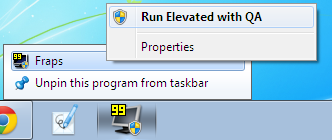
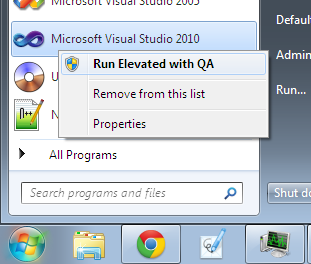
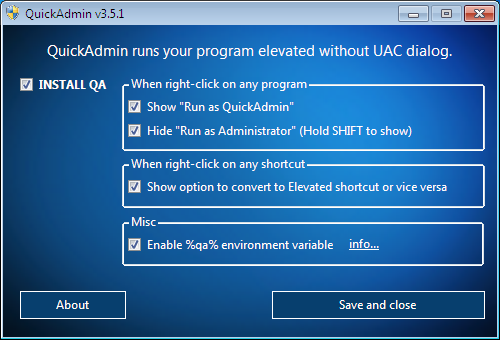
Had you been annoyed by UAC so much until you want to disable it for god sake? Hold it! You dont need to settle for that. UAC is good, it just needs QuickAdmin (QA) to make it perfect!QA runs your program elevated without UAC dialog if you right-click on the exe and click on Run as QuickAdmin, but the UAC will still shows up if you just double-click on the exe, which means the function of UAC is still there: preventing unauthorized program from running with administrator privileges. Because I thought when we click on Run as Administrator, Windows is supposed to just run the program as administrator, not ask us again in UAC.QA supports Elevated Shortcut and it is much better than other similar tools you can found on Internet by now. It uses VBS as executer which offers much better speed. You can convert many shortcuts to Elevated Shortcuts (and vice-versa) with just a click. The elevated shortcut can be used by multi-user, as long as you installed QA for every user.QA also supports de-elevating which is pretty useful for some situation. For example, you wrote a script for Win8, which requires administrator privileges to work. You run the script as administrator, but then if your script restart the Explorer directly, anything about Win8 Metro apps WOULD not open, unless you restart the Explorer with de-elevated privileges by using Win8 Task Manager, OR if the user installed QA, you can write a command in your script to restart the explorer with de-elevated privileges by using QA.



 Windows Vista and above
 View Screenshots(3)
 Comments
 Download




 Similar Software


 Recently Searched
 Software Categories
 Trending Software
 Like Us


