Works on: Windows 10 | Windows 8.1 | Windows 8 | Windows 7 | Windows XP | Windows 2000 | Windows 2003 | Windows 2008 | Windows Vista | Windows 2012 SHA1 Hash: db457f7ad9acbfb2966b5e09bec51edcb8537572 Size: 1.35 MB File Format: exe
Rating: 2.1
out of 5
based on 23 user ratings
Publisher Website: External Link Downloads: 326 License: Demo / Trial Version
QuickSpot File Compare is a demo software by Famtech Information Services Ltd. and works on Windows 10, Windows 8.1, Windows 8, Windows 7, Windows XP, Windows 2000, Windows 2003, Windows 2008, Windows Vista, Windows 2012.
You can download QuickSpot File Compare which is 1.35 MB in size and belongs to the software category File Management. QuickSpot File Compare was released on 2005-04-22 and last updated on our database on 2017-06-14 and is currently at version 4.2.
Thank you for downloading from SoftPaz! Your download should start any moment now. It would be great if you could rate and share:
Rate this software:
Share in your network:
QuickSpot File Compare Description
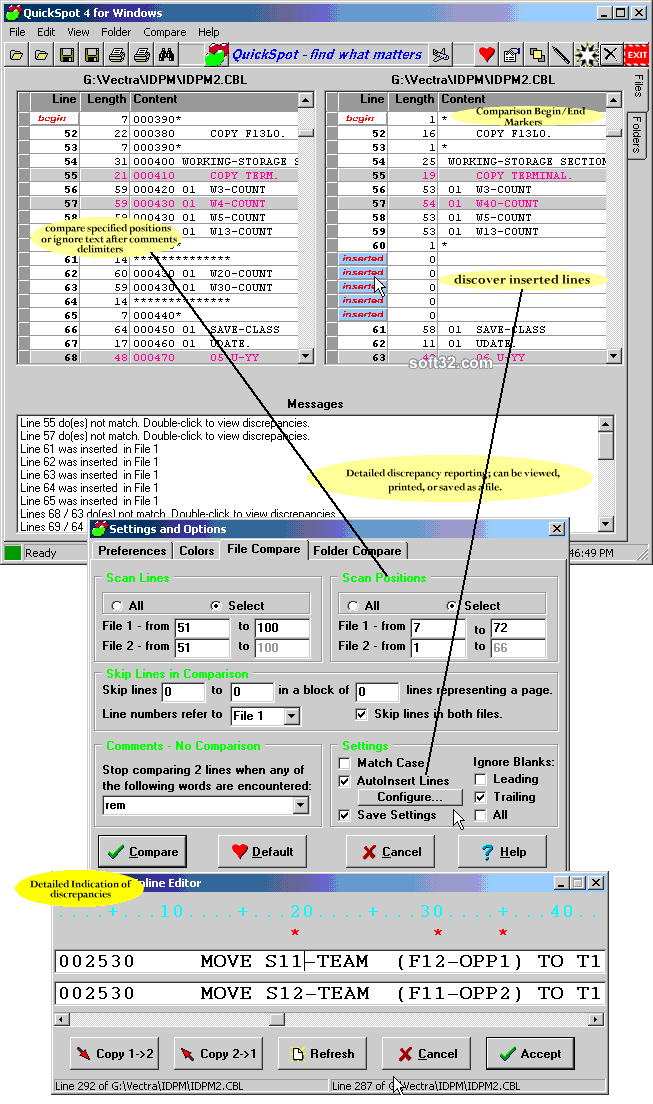
QuickSpot is a visual file compare utility and folder compare utility. It compares 2 text-files or folders and highlights the differences found between them. File-differences can be reported in detail, down to each individual byte or character. Lines that are not in synch will be highlighted for quick identification. Differences can be edited, viewed, printed or saved as a file.
In QuickSpot, you can set unique comparison-criteria that find the needle in the haystack! You can compare specific lines or all lines, narrow down the comparison across specific positions per line, and filter out source-code comments. You can also skip a number of lines repeatedly, or compare different ranges in the files.
File- and folder-editing features allow a quick fix of the discrepancies found by QuickSpot. A scrolling line-container lets you compare any 2 lines and shows all differences between them, character by character. You can deal with any discrepancy found right on the spot. In addition, there is a find/replace option and support for copying/merging text between the 2 files; files can also be saved and printed. In the folder-section, individual files can be viewed/opened, deleted, renamed, moved or copied.
Various options are available how to display the loaded files or folders and the discrepancies between them. All settings can be changed at any time and can be saved permanently.
QuickSpot can be run in a batch process, comparing 2 files or folders that are supplied on the command-line as arguments, and writing the results into a file, which is also supplied as a further command-line argument. This works both from a command-window (the DOS-prompt) and from the Windows Run menu.
Where to buy?
Last updated price and discount information 9 years agoupdate now



 Windows XP and above
 View Screenshots(3)
 Comments
 Download





 Similar Software


 Recently Searched
 Software Categories
 Trending Software

 Like Us


