Works on: Windows 10 | Windows 8.1 | Windows 8 | Windows 7 | Windows 2012 SHA1 Hash: fa2ac9b08d35693ee3f34b50b8c9d6a045aba4aa Size: 1.49 MB File Format: exe
Rating: 2.2
out of 5
based on 23 user ratings
Publisher Website: External Link Downloads: 148 License: Demo / Trial Version
SecureSafe Pro is a demo software by Wincatalog.com and works on Windows 10, Windows 8.1, Windows 8, Windows 7, Windows 2012.
You can download SecureSafe Pro which is 1.49 MB in size and belongs to the software category Password Managers and Generators. SecureSafe Pro was released on 2011-02-10 and last updated on our database on 2017-03-09 and is currently at version 2.74.
Thank you for downloading from SoftPaz! Your download should start any moment now. It would be great if you could rate and share:
Rate this software:
Share in your network:
SecureSafe Pro Description
If you are having problems remembering all your access passwords and logins, would like to protect yourself against identity theft and need a reliable software solution to store files with confidential information in one place safely and securely, you need to get SecureSafe Pro. Sure, it may sound like a sales push, but you'll change your mind once you try it. After all, great software sells itself. And here is why:
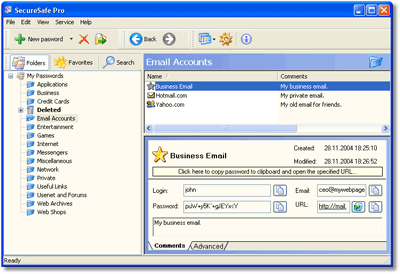
First, SecureSafe Pro is 100% free to download and try. Second, it uses a military-grade encryption standard approved and used by the US Department of Defense (namely AES, Advanced Encryption Standard with 256-bit key). Third, it frees you from having to remember all of your passwords and logins. They are stored in a database tree, which is very easy to search and navigate.
When you visit a site, simply click the SecureSafe Pro icon conveniently located in the system tray, enter your access password and that's it. Never check "Remember my login and password" box on websites, since this is not safe and may lead to hackers getting access to your private information, or worse yet - stealing your identity. Use SecureSafe Pro instead.
The program also includes a number of safety precautions, such as the unloading of access data if the program is left idle, and a "tough password generator" feature.
This program is not just another password keeper. You can store regular files inside the program. The program can store any file and all files can be launched from SecureSafe Pro. The files stored with SecureSafe Pro won't be visible and accessible to anybody but you. There are no limits to how many entries you can store and the program is incredibly easy to use.
If you find any solution that works better than SecureSafe Pro, let us know. But since such a program has not yet been released, we suggest you take advantage of your free SecureSafe Pro test drive.
Where to buy?
Last updated price and discount information 9 years agoupdate now



 Windows 7 and above
 View Screenshots(3)
 Comments
 Download





 Similar Software


 Recently Searched
 Software Categories
 Trending Software


 Like Us


