Works on: Windows 10 | Windows 8.1 | Windows 8 | Windows 7 | Windows XP | Windows 2000 | Windows 2003 | Windows 2008 | Windows Vista | Windows 2012 SHA1 Hash: c7c66aa0cc5f8c15eab0b3ccf97cda28dd2e3ff4 Size: 4.57 MB File Format: msi
Rating: 2.6
out of 5
based on 23 user ratings
Downloads: 1264 License: Free
WinNote is a free software by Siam Gems and works on Windows 10, Windows 8.1, Windows 8, Windows 7, Windows XP, Windows 2000, Windows 2003, Windows 2008, Windows Vista, Windows 2012.
You can download WinNote which is 4.57 MB in size and belongs to the software category Text editors. WinNote was released on 2011-03-28 and last updated on our database on 2017-04-23 and is currently at version 1.
Thank you for downloading from SoftPaz! Your download should start any moment now. It would be great if you could rate and share:
Rate this software:
Share in your network:
WinNote Description
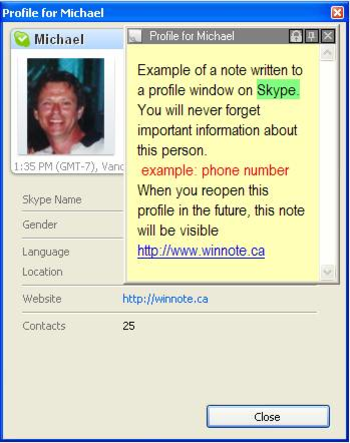
WinNote allows a user to write their own online notes, comments, reminders that attach directly to an active window on their computer. Reopen this window in the future, the note you wrote will be visible. These windows can be a website, email, spreadsheet, document, or any computer window that has a title.Other note software programs attach their written notes to the computers desktop, WinNotes written notes attach directly to the computer window the note was written for.WinNote Features: Free notes, or desktop notes, comments, reminders that are not associated to a particular window may also be written. WinNotes advantage is that its desktop notes, may contain complete large multi page files.Screenshot or Screen Capture is another feature of WinNote. Choose a portion or all of your screen and apply that Screenshot or Screen Capture to a note or other options. Management Console, keeps all your notes, comments, reminders, desktop notes, sreenshots, screen capture, files, shopping lists (collected information) in a Management Console, which can be organized as the user likes. The look and feel of this Management Console is very similar to Microsofts email application OutlookMultiple Users on one computer who have their own databases and preference setting for their notes, comments, reminders, screenshots.Personal Notes and reminders can be attached to any active window, including secondary windows or child windows. These notes will reappear when this window is opened again.Online Shopping is simplified. All information and photos you find that are important while you shop online, can be dragged into a Note along with its web link. No need to bookmark dozens of sites you have visited. You may also write your own comments about why you like that item. Email this note to your better half or friend.



 Windows 2000 and above
 View Screenshots(1)
 Comments
 Download




 Similar Software


 Software Categories
 Trending Software

 Like Us

 Recently Searched