Version: 6.2 Last Updated: 14 Jun 2017 Release: 03 Jun 2011 Category: CD DVD Blu-ray Tools
Rate this software:
1698 downloads
View Screenshots(2)
Comments
Download
Liked it? Tell others:
Xilisoft MP4 to DVD Converter Details
Works on: Windows 10 | Windows 8.1 | Windows 8 | Windows 7 | Windows XP | Windows 2000 | Windows 2003 | Windows 2008 | Windows Vista | Windows 2012 SHA1 Hash: 4fddc2975e775e11dfe08ff36fe1b18461b9c290 Size: 35.11 MB File Format: exe
Rating: 2.8
out of 5
based on 23 user ratings
Publisher Website: External Link Downloads: 1698 License: Demo / Trial Version
Xilisoft MP4 to DVD Converter is a demo software by Xilisoft.com and works on Windows 10, Windows 8.1, Windows 8, Windows 7, Windows XP, Windows 2000, Windows 2003, Windows 2008, Windows Vista, Windows 2012.
You can download Xilisoft MP4 to DVD Converter which is 35.11 MB in size and belongs to the software category CD DVD Blu-ray Tools. Xilisoft MP4 to DVD Converter was released on 2011-06-03 and last updated on our database on 2017-06-14 and is currently at version 6.2.
Thank you for downloading from SoftPaz! Your download should start any moment now. It would be great if you could rate and share:
Rate this software:
Share in your network:
Xilisoft MP4 to DVD Converter Description
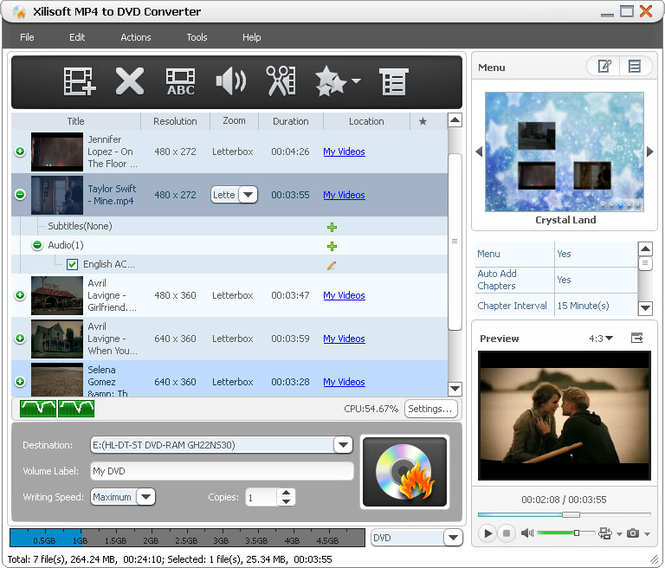
Xilisoft MP4 to DVD Converter qualifies you to preserve your favorite MP4 videos by burning them into DVDs for you to enjoy them on DVD players. It provides the most convenient solution to convert videos in format of MP4, MPEG, MPG, M2V, DAT, VOB, M4V, and H.264 as well as iPhone videos (MOV) to a format compatible with most DVD players and burn them into DVD discs, DVD folders and ISO files.
New feature:
Support minimize the window when burning DVD.
Features
1.Convert videos in format of MP4, MPEG, MPG, M2V, DAT, VOB, M4V or H.264 to a format which can be played in DVD players and burn them into high-quality DVDs.
2.Convert iPhone MOV videos to the format supported in DVD players and burn them to high-class DVDs.
3.Create ISO file on disc or DVD folders from MP4 videos to satisfy diverse requirements.
4.Convert MP4 videos to multiple DVD formats, including DVD-R, DVD+R, DVD-RW, DVD+RW, DVD+R DL, DVD-R DL, DVD-5 and DVD-9.
5.You are enabled to create tailored DVD menus to make your DVDs distinctive.
6.Free to modify the layout and pattern of DVD menus. Scores of menu templates are also equipped for you to choose.
7.Attach your favored music and picture into the menu as a background music/picture and you can preview the effects you've added.
8.Directly start playing DVDs by skipping DVD menus.
9.Clip video segments you like and merge them together to burn a DVD.
10.You are allowed to adjust video frame size, regulate image effect or add pictures as well as watermark into your videos.
11.Set different audio tracks and subtitles of your videos before burning them to DVDs. You can adjust the audio volume, set subtitle language and etc.
12.More parameters to adjust video/audio settings are available: video/audio quality, bit rate, television standard, aspect ratio, resizes mode, channel, sample rate and etc.
13.You can preview videos in the built-in player and take snaps to your preference.
14.Divide your DVDs to several parts by adding chapters.
Where to buy?
Last updated price and discount information 9 years agoupdate now



 Windows XP and above
 View Screenshots(2)
 Comments
 Download





 Similar Software


 Software Categories
 Trending Software


 Like Us


 Recently Searched