Works on: Windows 10 | Windows 8.1 | Windows 8 | Windows 7 | Windows XP | Windows 2000 | Windows 2003 | Windows 2008 | Windows Vista | Windows 2012 SHA1 Hash: 124dbeb575b46a85c41e819ea4e0089031162982 Size: 2.34 MB File Format: zip
Rating: 2.4
out of 5
based on 23 user ratings
Downloads: 158 License: Free
impelDeviceInfo is a free software by Impeltec and works on Windows 10, Windows 8.1, Windows 8, Windows 7, Windows XP, Windows 2000, Windows 2003, Windows 2008, Windows Vista, Windows 2012.
You can download impelDeviceInfo which is 2.34 MB in size and belongs to the software category Hard Disk and CD DVD BluRay Utilities. impelDeviceInfo was released on 2014-08-21 and last updated on our database on 2017-04-26 and is currently at version 1.4.
Thank you for downloading from SoftPaz! Your download should start any moment now. It would be great if you could rate and share:
Rate this software:
Share in your network:
impelDeviceInfo Description
impelDeviceInfo is a free system utility that runs on Windows-based devices to display informational and diagnostic data about that device. It is designed to work as a support tool, allowing end-users and support agents to easily obtain information commonly required for device identification and troubleshooting.When maintaining and supporting Windows-based devices, easy access to information about that device is important. impelDeviceInfo can assist support engineers with identifying, locating and diagnosing the device. Windows itself can display all this information, but it is not aggregated into the one place - it is in numerous places such as system settings, Computer Management console, registry, WMI. When communicating with support personnel, common information needs to be supplied by the end-user, such as computer name or IP address. This information is not always easy for an end-user to locate, particularly if they are not experienced with IT devices. A common scenario is for the Device Information utility to be installed on all Windows-based devices in an organisation, often being included in a Standard Operating Environment (SOE) image. The utility is integrated as a selectable option in the impeltec SOE Portal and can be selected for automatic inclusion in an SOE image configuration.



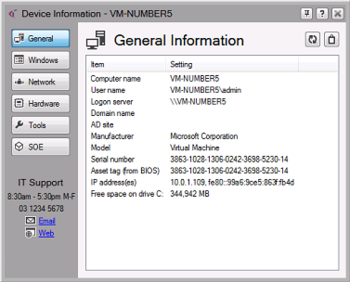
 Windows XP and above
 View Screenshots(1)
 Comments
 Download




 Similar Software


 Recently Searched
 Software Categories
 Trending Software


 Like Us
